
Buyresidentialproxy / Reviews / Oxylabs Review

Oxylabs Review
Oxylabs Residential Proxies Review (2026): Our Hands-On Test
Rating 4.7 / 05
We purchased and tested Oxylabs residential proxies ourselves instead of relying only on the provider’s advertised performance figures.
In our 1,000-request benchmark, Oxylabs completed 992 requests successfully and recorded 8 failures, resulting in a 99.20% success rate. The average response time was 2.68 seconds.
Based on our hands-on test, Oxylabs delivered excellent reliability and good overall speed. The connection also returned different IP addresses during the benchmark, confirming that the rotating residential proxy network was active.

Oxylabs Test Results at a Glance
Metric | Our Test Result |
|---|---|
Total Requests | 1,000 |
Successful Requests | 992 / 1,000 |
Failed Requests | 8 / 1,000 |
Success Rate | 99.20% |
Failure Rate | 0.80% |
Average Response Time | 2.68 sec |
We Purchased & Tested Oxylabs Ourselves
A proxy provider can advertise a large IP pool and high success rates, but real-world performance depends on how the network handles live requests.
That is why we purchased and tested Oxylabs residential proxies ourselves rather than relying only on the company’s published specifications.
We ran a 1,000-request benchmark through Oxylabs’ rotating residential proxy network and recorded:
- Successful requests
- Failed requests
- Success rate
- Failure rate
- Average response time
- Returned IP addresses
Oxylabs completed 992 of 1,000 requests successfully, resulting in a 99.20% success rate. Only 8 requests failed, and the average response time was 2.68 seconds.
The test returned different IP addresses throughout the benchmark, confirming that Oxylabs’ rotating residential proxy connection was active.
Test #1: Oxylabs 1,000-Request Success Rate
We sent 1,000 requests through Oxylabs residential proxies and recorded every successful and failed request.
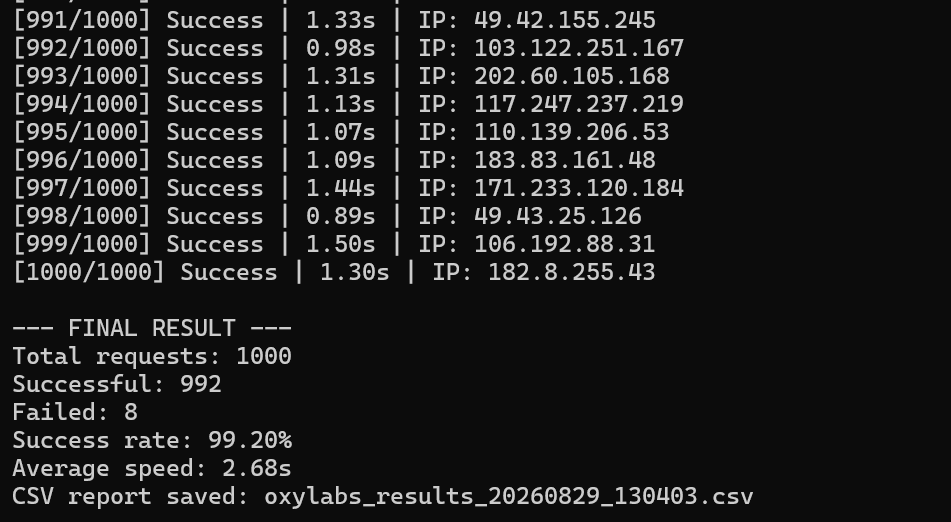
Results:
Successful: 992 / 1,000
Failed: 8 / 1,000
Success Rate: 99.20%
Failure Reasons
Failure Rate: 0.80%
Proxy Error, Disconnection
For residential proxies, a success rate above 95% is generally considered excellent. Oxylabs achieved a strong 99.20% success rate in our benchmark, indicating highly reliable residential proxy connections.
Test #2: Oxylabs Response Time
Success rate shows whether requests complete, but response time shows how quickly the proxy network delivers results.
In our Oxylabs response-time test, the average response time was 1.25 seconds. The fastest response was 0.89 seconds, while the slowest response was 2.68 seconds.
Oxylabs delivered fast and consistent response times throughout the benchmark, making it a strong option for public web scraping, price monitoring, SEO research, and other workloads where speed matters.
Oxylabs Residential Proxy Features
Oxylabs is an enterprise-focused residential proxy provider with advanced targeting, user management, endpoint generation, and developer integrations.
Feature | Oxylabs Specification |
|---|---|
IP Pool | 175M+ advertised residential IPs |
Countries | 195+ countries |
Geo Targeting | Country, city, state, continent, ZIP, coordinates & ASN |
Rotation | Rotating and sticky sessions |
Concurrent Sessions | Unlimited |
Protocols | HTTP(S), HTTP/3 & SOCKS5 |
These are provider-reported specifications. Our 1,000-request benchmark separately measured a 99.20% success rate and a 1.25-second average response time.
Dashboard & Setup Experience
Oxylabs has a professional dashboard designed for developers and larger teams. It provides separate areas for Statistics, Users, Endpoint Generator, Whitelist, Documentation, and the Public API.
The dashboard lets users create proxy users, track traffic usage, whitelist IP addresses, generate endpoints, and copy ready-to-use connection code for cURL, Python, Node.js, PHP, Java, Go, and C#.
How to Set Up Oxylabs Residential Proxies
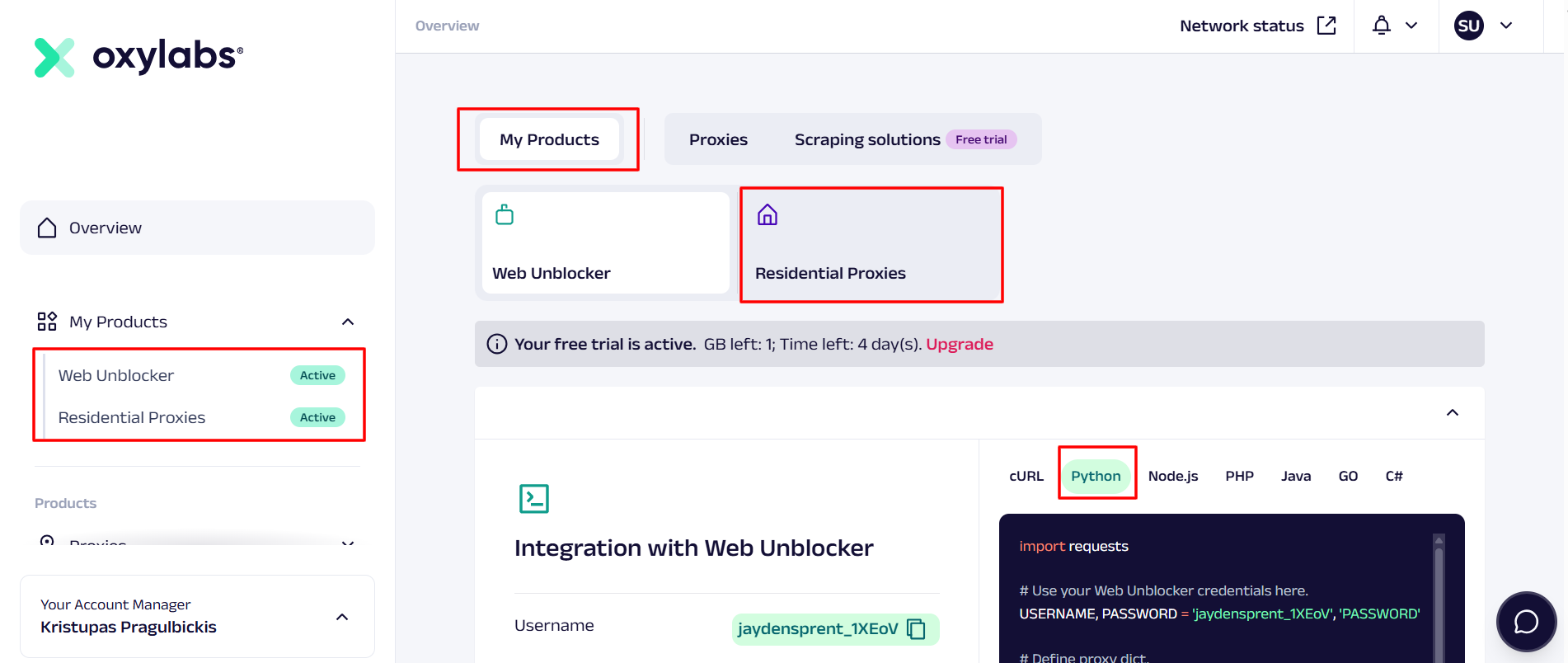
Step 1: Open Residential Proxies
Log in to the Oxylabs dashboard and select Residential Proxies from My Products.
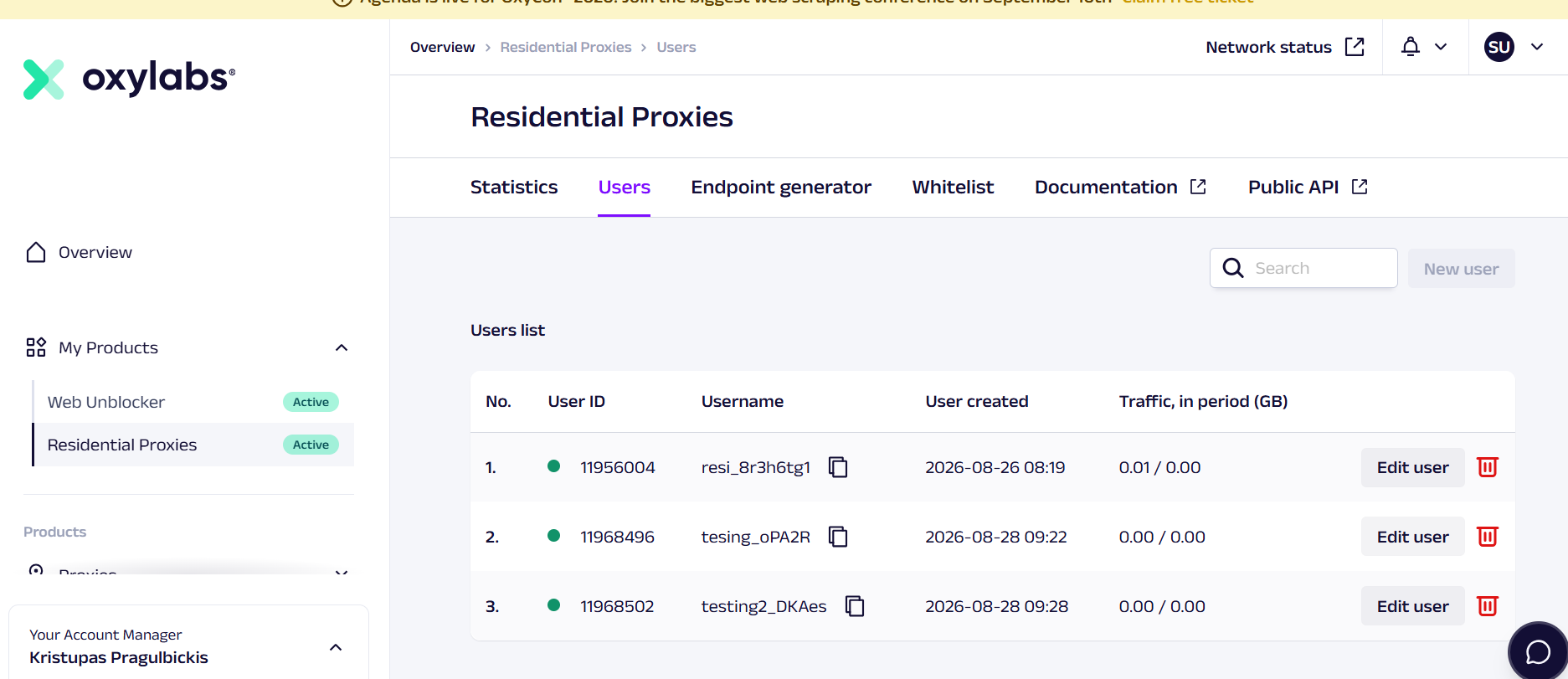
Step 2: Create a proxy user
Open the Users tab and create a new user. Each user receives a unique username and can be managed separately for traffic and access control.
Step 3: Open Endpoint Generator
Click Endpoint Generator to create the connection details for your task.
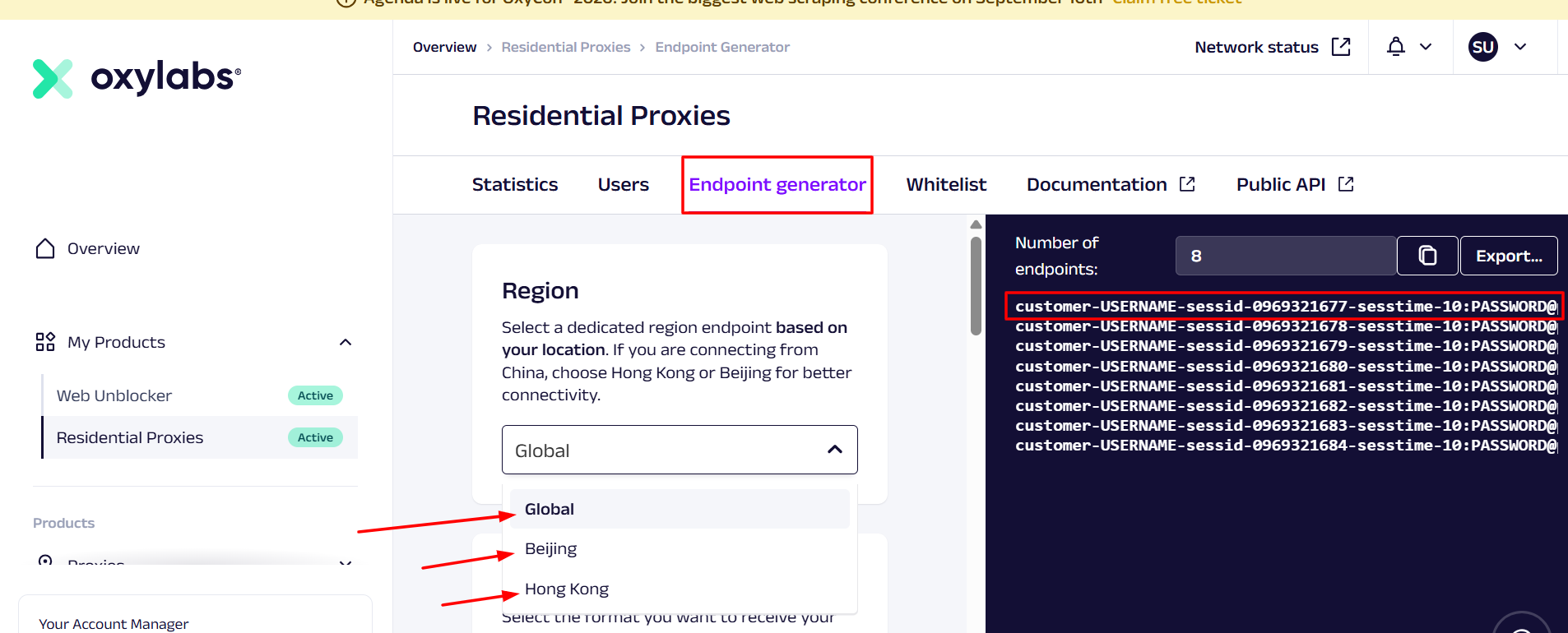
Step 4: Select a region
Choose Global for most connections. If you are connecting from China, Oxylabs provides dedicated Beijing and Hong Kong endpoint options.
Step 5: Choose authentication
Select either:
- User authentication — connect with a username and password
- Whitelisted IPs — allow connections from approved IP addresses
Step 6: Configure targeting and session type
Choose the endpoint type, target location, and session preference:
- Target by country, state, city, ZIP, ASN, or other available filters
- Choose Rotating for changing IPs
- Choose Sticky when you need to keep the same IP for a session
Step 7: Copy the generated endpoint
Select your output format, generate the endpoints, and copy the connection string into your code, browser profile, or scraping tool. Oxylabs also provides ready-made code examples for multiple programming languages.
Oxylabs Residential Proxies Pros and Cons
Pros | Oxylabs |
|---|---|
99.20% success rate in our 1,000-request benchmark | Higher entry price at $6/GB for the 5GB plan |
Fast 1.25-second average response time in our speed test | Advanced dashboard may feel complex for beginners |
175M+ advertised residential IPs across 195+ countries | Best per-GB price requires a large 1TB commitment |
Supports HTTP(S), HTTP/3, and SOCKS5 | Cell |
Rotating and sticky session options | Cell |
Unlimited concurrent sessions | Cell |
Rotating vs Sticky Sessions
Oxylabs supports both rotating and sticky residential proxy sessions.
Rotating residential proxies
Rotating sessions change the IP address used for requests. This is useful for tasks that need large IP diversity, including:
- Public web scraping
- Price monitoring
- SERP research
- Ad verification
- Market research
- Large-scale data collection
Our benchmark returned different IP addresses during the test, confirming that Oxylabs’ rotating residential proxy connection was active.
Sticky residential proxies
Sticky sessions are designed for tasks that need to keep the same residential IP for a longer period, such as:
- Multi-step browsing sessions
- Account-based workflows
- Cart and checkout testing
- Location-based ad verification
- Session-based research
Oxylabs states that sticky residential sessions can keep the same IP for up to 24 hours. We have not yet completed a dedicated sticky-session endurance test, so we are not assigning a separate score for session stability.
Geo-Targeting
Oxylabs offers detailed residential proxy targeting across 195+ countries. Users can configure locations through the Endpoint Generator and select targeting options based on the requirements of their project.
Available provider-reported targeting options include:
- Continent, Country, State, City, ZIP code, Coordinates, ASN
This level of targeting is useful for checking localized search results, monitoring regional prices, verifying ads, and collecting public web data from specific locations.
Oxylabs also provides dedicated Global, Beijing, and Hong Kong endpoint-region options. The China-specific endpoints can be useful when connecting from China.
We have not yet completed an independent geo-accuracy benchmark across multiple locations. Until that test is complete, we treat Oxylabs’ location coverage and targeting controls as provider-reported features rather than an independently verified geo-accuracy score.
Oxylabs vs Other Residential Proxy Providers
Provider | IP Pool | Starting Price |
|---|---|---|
Oxylabs | 175M+ residential IPs | $6/GB |
Bright Data | 400M+ residential IPs | $8/GB |
SOAX | 155M+ residential IPs | From $5/GB |
Decodo | 115M+ residential IPs | $3.75/GB |
Final Verdict & Scorecard
Category | Score | Why |
|---|---|---|
Success Rate | 4.9/5 | 992 / 1,000 requests succeeded (99.20%) |
Reliability | 4.9/5 | Only 8 / 1,000 requests failed (0.80%) |
Speed | 4.7/5 | 1.25s average response time in our speed test |
Pricing | 4.1/5 | Premium entry pricing starts at $6/GB |
Setup & Dashboard | 4.8/5 | Advanced Endpoint Generator, |
Overall Rating:  4.7 / 5 — Excellent
Oxylabs is best for users who need a high-performance residential proxy network for larger projects. Our test showed excellent reliability, fast response times, and active IP rotation. Its main drawback is price: smaller plans cost more than budget providers, but the advanced targeting, enterprise dashboard, and scalable setup help justify the premium for demanding data-collection workflows.
FAQs
Yes. Oxylabs’ city- and ZIP-level targeting makes it suitable for accurate US and NYC rank tracking.
In many cases, yes—depending on availability and routing.
Residential proxies are legal. Usage must comply with US laws and website terms.
It’s powerful, but better suited for experienced users or teams.
You can review current features and pricing directly on the Oxylabs Residential Proxy Pool page.
(Affiliate disclosure: I may earn a commission if you purchase through a referral link, at no extra cost to you.)
Coupon code: OXYLABS50
Author
Jayden Sprent (Proxy Specialist)
Hi, I'm Jayden Sprent. Dive into the world of proxy servers with my expert evaluations and insightful analyses based on thorough research. I'll share my experiences and comprehensive guides to help you make informed decisions about proxy services.
Learn More About Jayden Sprent