
Buyresidentialproxy / Reviews / Proxylane Residential Proxies

Proxylane Review
Proxylane Residential Proxies Review (2026): Our Hands-On Test

Rating 4.7 / 05
We tested ProxyLane residential proxies across 3,000 requests, including 1,000 Amazon requests and 2,000 general test requests, to measure connection reliability and response time.
Across all three tests, 2,994 requests succeeded and 6 failed, delivering a 99.80% overall success rate. The combined average response time was approximately 2.10 seconds, with individual responses ranging from 1.50 seconds to 19.20 seconds.
These combined results show strong reliability in our tested setup, although some requests took considerably longer than the average. In this review, we explain the test results, dashboard, setup process, and practical strengths and limitations to help you decide whether ProxyLane fits your needs.
ProxyLane 3,000-Request Success Rate
We sent 3,000 requests through ProxyLane residential proxies—1,000 to Amazon and 2,000 for general testing—and recorded every successful and failed request. Across all three runs, 2,994 requests succeeded and 6 failed, resulting in a 99.80% overall success rate.
#1 ProxyLane Testing Result
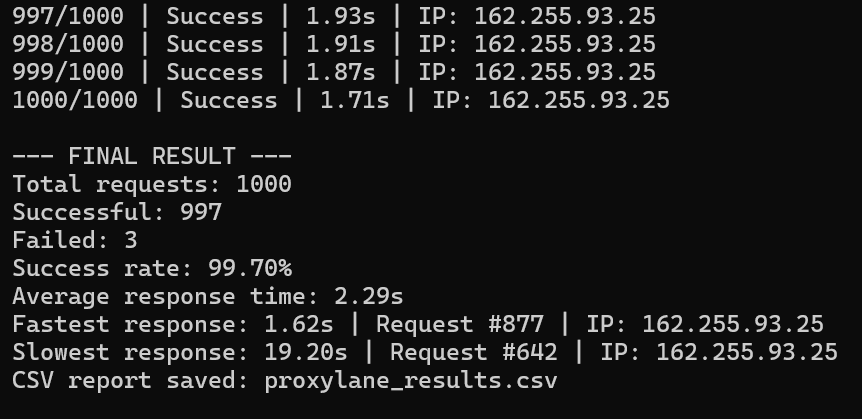
Results:
Successful: 997/1000
Failed: 3/1000
Success Rate: 99.70%
Failure Reasons: Proxy Error, Disconnection
#2 ProxyLane Testing Result
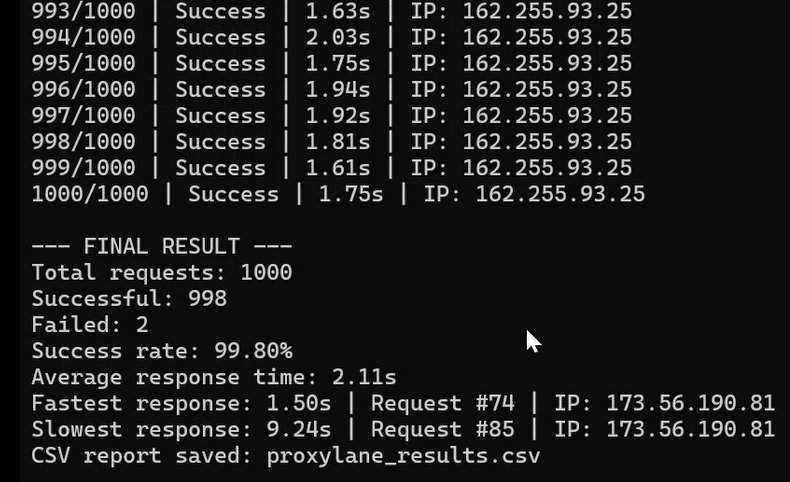
Results:
Successful: 998/1000
Failed: 2/1000
Success Rate: 99.80%
Failure Reasons: Proxy Error, Disconnection
#3 ProxyLane Testing Result
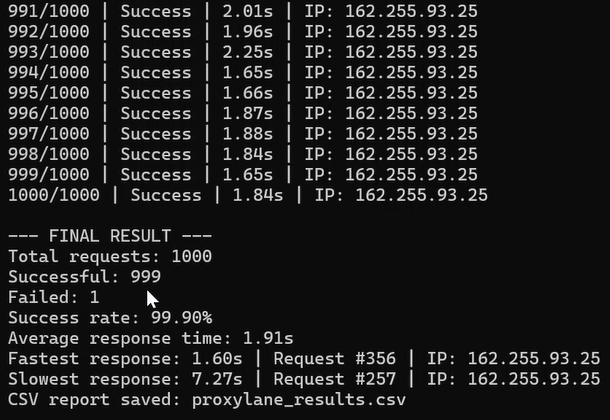
Results:
Successful: 999/1000
Failed: 1/1000
Success Rate: 99.90%
Failure Reasons: Proxy Error, Disconnection
ProxyLane Test Results at a Glance
Metric | Amazon Test#1 | General Test #2 | General Test #3 | Overall Results |
|---|---|---|---|---|
Total Requests | 1,000 | 1,000 | 1,000 | 3,000 |
Successful Requests | 997 | 998 | 999 | 2,994 |
Failed Requests | 3 | 2 | 1 | 6 |
Success Rate | 99.70% | 99.80% | 99.90% | 99.80% |
Average Response Time | 2.29s | 2.11s | 1.91s | ≈2.10s |
Fastest Response | 1.62s | 1.50s | 1.60s | 1.50s |
Slowest Response | 19.20s | 9.24s | 7.27s | 19.20s |
Across all three tests, ProxyLane achieved a 99.80% overall success rate, with only 6 failed requests out of 3,000. The combined average response time was approximately 2.10 seconds, calculated from the reported averages of the three test runs.
About ProxyLane Residential Proxies
ProxyLane is a residential proxy provider focused on SEO tracking and browser automation. The company advertises 28 million+ residential IPs, pay-as-you-go billing, and bandwidth that never expires, allowing users to consume purchased traffic at their own pace.
According to its website, ProxyLane offers a 350 MB paid trial for $1.95, registration without KYC, and 24/7 human support through chat, email, and Telegram. It also describes its residential IPs as ethically sourced and having low fraud scores.
In our 3,000-request benchmark, ProxyLane achieved a 99.80% overall success rate and an approximately 2.10-second average response time. These results demonstrate strong reliability in our tested setup, but do not establish the website’s broader claims of block-free or CAPTCHA-free access.
ProxyLane Residential Proxy Overview
Feature | Proxylane Specification |
|---|---|
Proxy Type | Residential proxies |
Advertised IP Pool | 28 million+ residential IPs |
Main Use Cases | SEO tracking and browser automation |
Billing Model | Pay-as-you-go |
Bandwidth Expiration | Never expires, according to the provider |
Paid Trial | 350 MB for $1.95 |
KYC Requirement | No KYC, according to the provider |
Customer Support | 24/7 human support via chat, email, and Telegram |
ProxyLane Residential Proxy Pros and Cons
Pros
- Strong tested reliability: 99.80% success rate across 3,000 requests.
- Fast average response: Approximately 2.10 seconds across all three tests.
- Solid Amazon performance: 997 of 1,000 requests succeeded.
- Flexible billing: Pay-as-you-go traffic with no expiration, according to the provider.
- Small trial package: 350 MB for $1.95.
Cons
- Occasional slow responses: The slowest request took 19.20 seconds.
- Performance may vary depending on location
- Marketing claims exceed our test evidence
ProxyLane Dashboard & Setup Experience
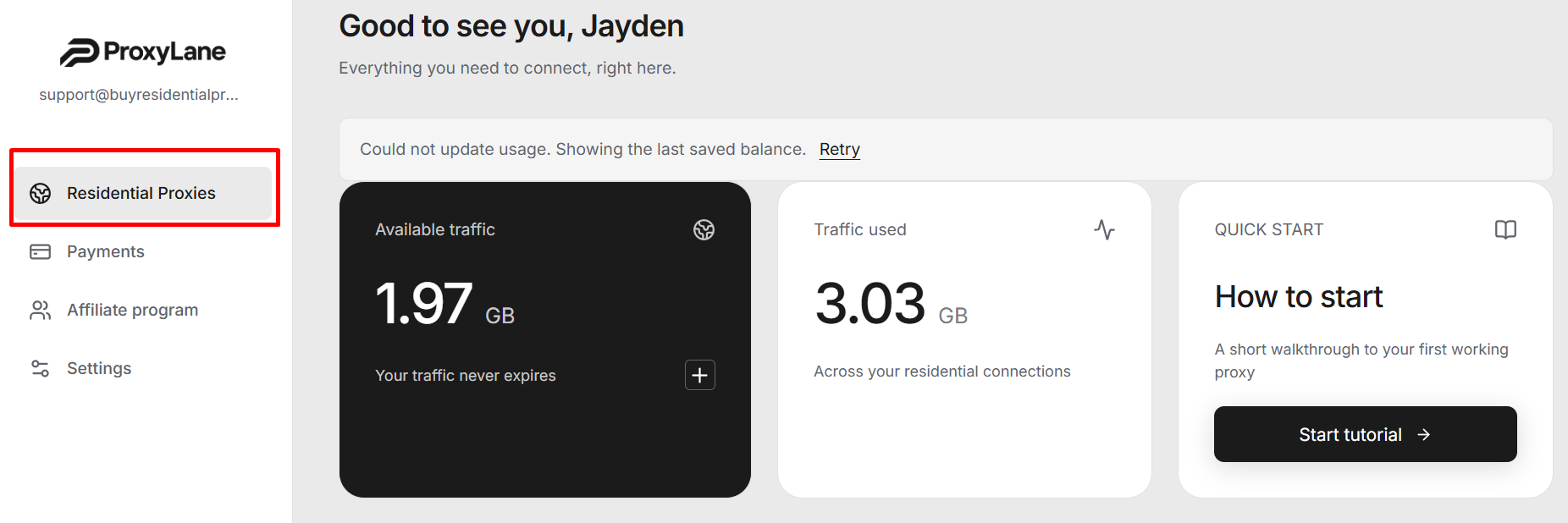
ProxyLane has a clean dashboard where users can check available traffic, monitor bandwidth usage, and access a quick-start tutorial. Its proxy configuration area includes connection format selection, endpoint count, copy and download options, and a built-in connection test. Code examples are available for cURL, Python, Playwright, and n8n.
After purchasing traffic, users can configure their proxies and copy the generated connection details into their browser, scraping tool, or code. They can also download the details as a .txt file and use the Test connection button to check the configuration.
How to Set Up ProxyLane Residential Proxies
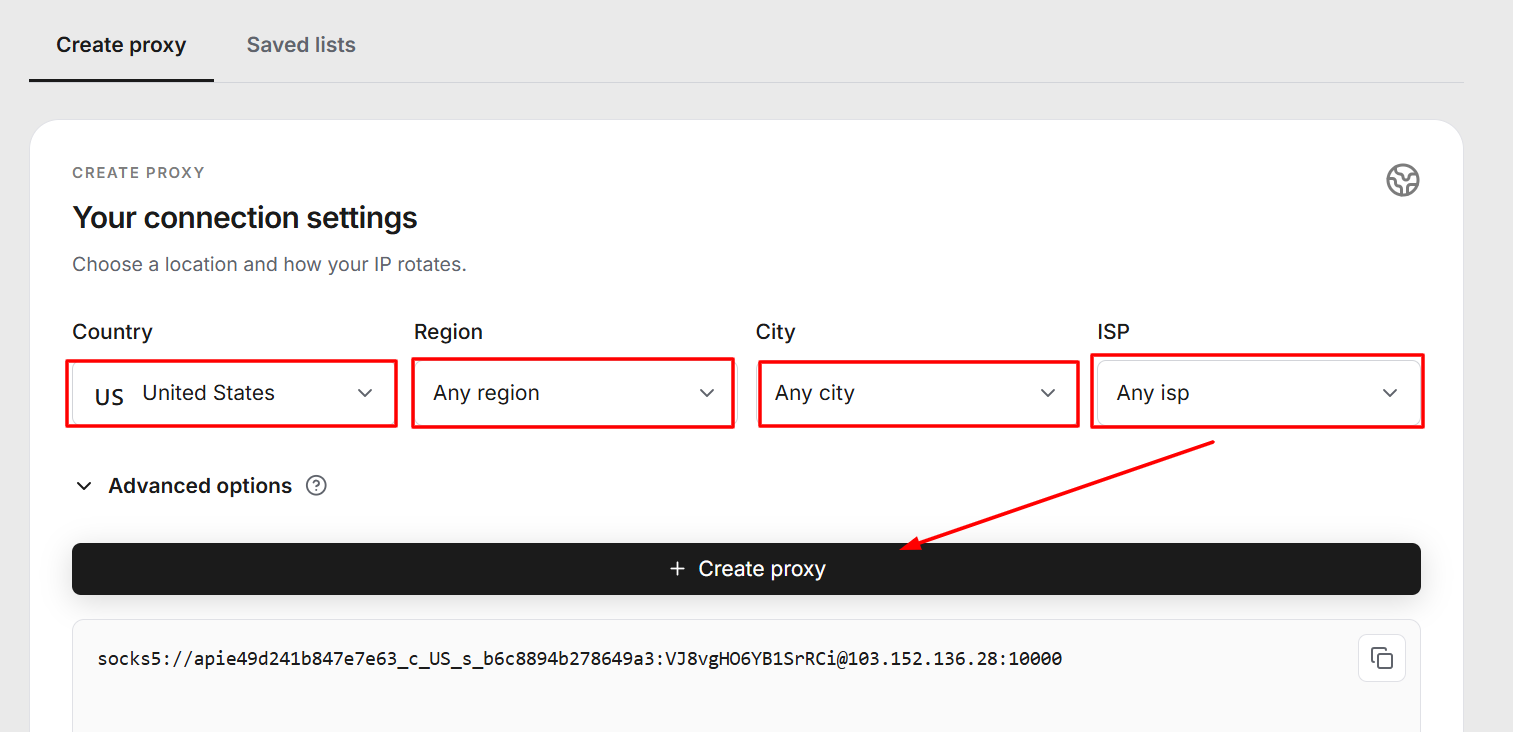
Step 1: Open Residential Proxies
Log in and select Residential Proxies from the left menu. Check your available traffic before starting. If the dashboard displays “Could not update usage,” click Retry to refresh the saved balance.
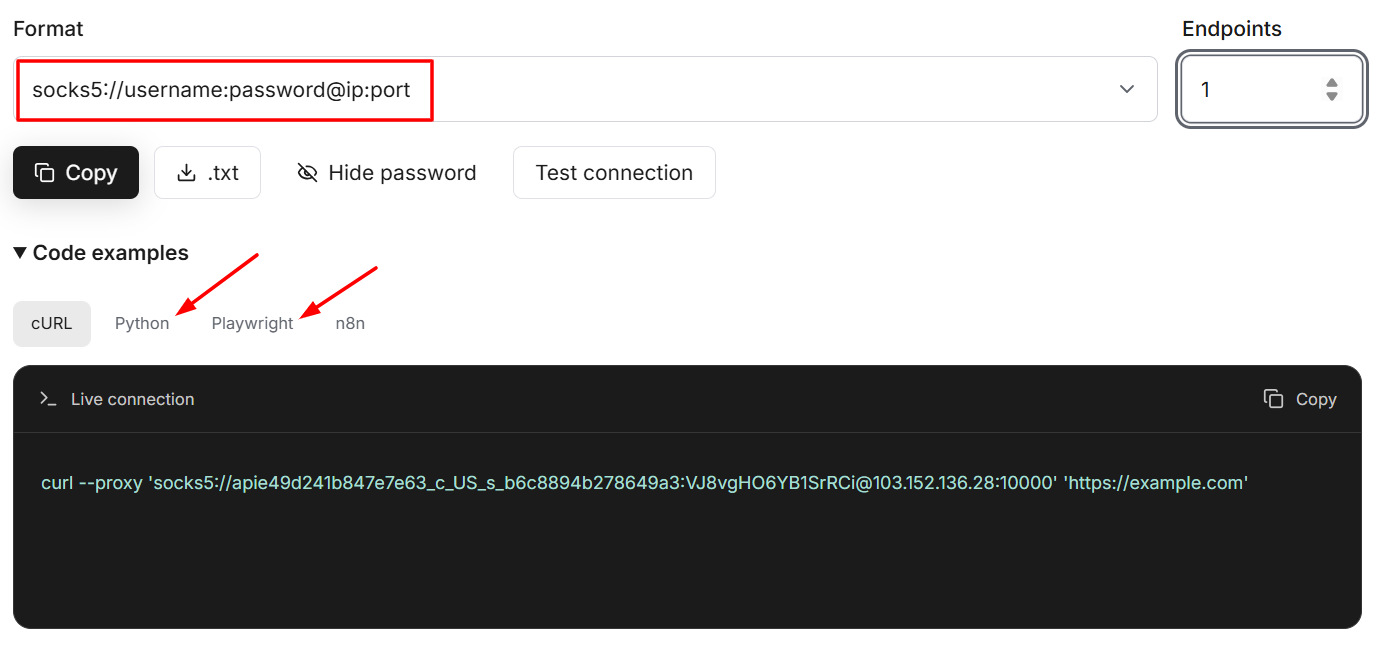
Step 2: Choose Your Connection Format
In the connection area, select the format your application requires. Our screenshot shows the SOCKS5 format:
socks5://username:password@ip:port
Set the Endpoints field to the number of proxy entries you need.
Step 3: Copy Your Proxy Details
Click Copy to copy the generated connection details, or use the .txt button to download them. If your application uses separate fields, enter the proxy host, port, username, and password individually, and select the matching protocol.
Step 4: Test the Connection
Click Test connection to check the generated configuration. Then test it inside your browser or application to confirm that requests pass through the proxy.
Step 5: Connect Your Automation Tool
Expand Code examples and choose cURL, Python, Playwright, or n8n for an integration example. Use the configuration in your workflow and monitor bandwidth consumption from the dashboard.
ProxyLane vs Other Residential Proxy Providers: Comparison
| Provider | Residential IP Pool | Starting Price | Best For |
|---|---|---|---|
| DataImpulse | 90M+ | $1 / GB | Budget users |
| Proxylane | 28M+ | $1.95 / GB | Budget users |
| Bright Data | 400M+ | $5–8 / GB | Enterprise scraping |
| Oxylabs | 175M+ | $6–8 / GB | Large-scale data collection |
| Decodo | 115M+ | $3/GB | Balanced price/performance |
Final Verdict & Scorecard
Category | Score | Why |
|---|---|---|
Success Rate | 4.9/5 | 2,994 of 3,000 requests succeeded, delivering a 99.80% overall success rate. |
Reliability | 4.8/5 | Each 1,000-request run achieved between 99.70% and 99.90% success. |
Speed | 4.5/5 | Approximately 2.10 seconds average response time, with a slowest response of 19.20 seconds. |
Pricing | Not rated | A 350 MB trial costs $1.95, but standard per-GB pricing was not provided for evaluation. |
Setup & Dashboard | 4.6/5 | Clear traffic overview, downloadable connection details, a connection test, and integration examples. |
 Overall Rating: 4.7 / 5
Scores are editorial assessments. The overall rating is the equal-weight average of the four scored categories; pricing is excluded.
ProxyLane delivered strong results in our 3,000-request benchmark, with 2,994 successful requests, 6 failures, and a 99.80% overall success rate. Its combined average response time was approximately 2.10 seconds across 1,000 Amazon requests and 2,000 general requests.
The dashboard’s connection tools and code examples make setup straightforward, while non-expiring traffic adds flexibility for occasional use. However, responses reached 19.20 seconds, so users should account for occasional delays. Our results support ProxyLane’s reliability for the tested workloads; its overall value also depends on the standard traffic price and performance on your target websites.
Frequently Asked Questions (FAQs)
ProxyLane is a residential proxy provider that advertises a pool of 28 million+ IPs for SEO tracking and browser automation. It offers pay-as-you-go billing and non-expiring traffic.
ProxyLane achieved a 99.80% overall success rate across 3,000 requests. We recorded 2,994 successful requests and 6 failures, combining 1,000 Amazon requests with 2,000 general test requests.
The combined average response time was approximately 2.10 seconds across our three test runs. The fastest recorded response was 1.50 seconds, while the slowest took 19.20 seconds. Results can vary depending on the target website, proxy location, and connection conditions.
In our Amazon benchmark, 997 of 1,000 requests succeeded, producing a 99.70% success rate with a 2.29-second average response time. This result applies to our tested configuration and does not guarantee the same performance across every Amazon page or workload.
The trial shown in ProxyLane’s advertised offer is 350 MB for $1.95. This is a paid trial, not a free trial.
According to ProxyLane, purchased traffic never expires, allowing users to consume their remaining bandwidth over time.
ProxyLane’s dashboard provides connection examples for Python, Playwright, cURL, and n8n. Users can copy generated proxy details or download them as a .txt file for use in compatible tools.
Although ProxyLane advertises “No Blocks” and “No CAPTCHAs,” our benchmark does not establish either as a guarantee. A successful request alone does not prove CAPTCHA-free access, and results may differ across websites and usage patterns.
Author
Jayden Sprent (Proxy Specialist)
Hi, I'm Jayden Sprent. Dive into the world of proxy servers with my expert evaluations and insightful analyses based on thorough research. I'll share my experiences and comprehensive guides to help you make informed decisions about proxy services.
Learn More About Jayden Sprent