
Buyresidentialproxy / Reviews / Geonode Residential Proxy

Geonode Review
Geonode Residential Proxies Review (2026): Our Hands-On Test
Rating 4.5 / 5
We purchased and tested Geonode residential proxies ourselves to see how they perform in a real 1,000-request benchmark.
Geonode completed 988 of 1,000 requests, resulting in a 98.80% success rate. Only 12 requests failed, which is a strong completion result for most web-data and automation tasks.
The average response time was 3.12 seconds. The fastest request completed in just 0.40 seconds, but one request took 1,796.54 seconds—an extreme outlier that shows why success rate alone does not tell the full performance story.
Overall, Geonode delivered reliable request completion in our test, but response-time consistency should be considered for time-sensitive workflows.

Geonode Test Results at a Glance
Metric | Our Test Result |
Total Requests | 1,000 |
Successful Requests | 988 / 1,000 |
Failed Requests | 12 / 1,000 |
Success Rate | 98.80% |
Failure Rate | 1.20% |
Average Response Time | 3.12 sec |
We Purchased and Tested Geonode Ourselves
A proxy provider can advertise a large IP pool and high uptime, but those claims do not always show what happens when you send real requests through the network.
That is why we purchased Geonode residential proxy traffic, configured the proxies, and ran our own benchmark instead of simply repeating the specifications on its website.
Our main performance test included 1,000 real requests.
We recorded:
- successful requests;
- failed requests;
- success rate;
- failure rate; and
- average response time.
Geonode completed 988 of 1,000 requests, giving it a 98.80% success rate. This was a strong result for connection reliability, although the test also revealed one unusually slow response that affected consistency.
Test #1: Geonode 1,000-Request Success Rate
Our first test measured whether Geonode residential proxies could complete a high number of requests reliably.
We sent 1,000 requests through the Geonode network and recorded the outcome of every request.
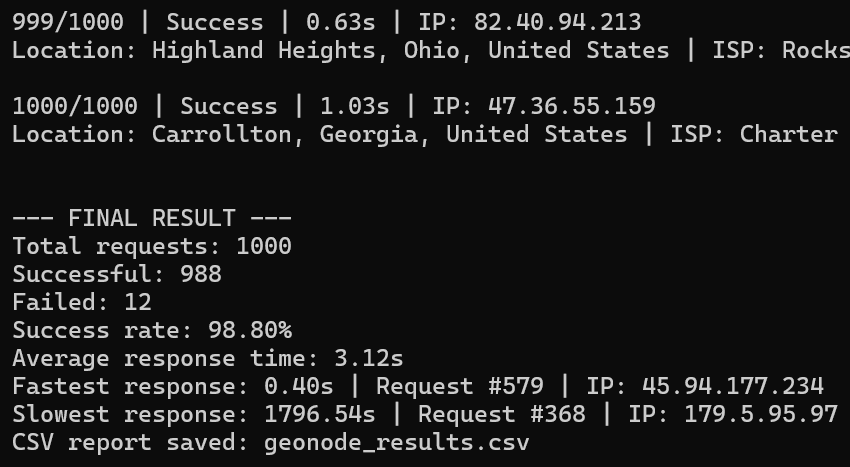
Results:
Successful: 988/1000
Failed: 12/1000
Success Rate: 98.80%
Failure Reasons 1.20%
Proxy Error
Disconnection
A 98.80% success rate is a strong result. Geonode completed nearly every request in this benchmark, with only 12 failures across the full test.
For web scraping, price monitoring, SERP research, and other workflows that can retry occasional failed requests, this level of completion should be practical. However, projects that require near-perfect request reliability should still test Geonode against their own target websites.
Test #2: Geonode Response Time
Success rate tells us whether requests complete. It does not show how long each request takes.
So we also recorded response time during our 1,000-request Geonode test.
Our Average Response Time: 3.12 Seconds
The fastest request completed in 0.40 seconds, showing that Geonode can return a response quickly. However, the slowest request took 1,796.54 seconds—an extreme outlier.
That means the 3.12-second average should be read alongside the full result, not as proof that every request was consistently fast.
The more useful summary from our benchmark is:
98.80% success rate + 3.12-second average response time
Geonode delivered strong request completion, but the unusually slow response shows that time-sensitive projects should use sensible request timeouts and retry logic.
Geonode Residential Proxy Features
Now let’s separate our hands-on test results from what Geonode currently advertises and what we could configure in its dashboard.
Geonode advertises a residential network with 30–50 million unique IPs rotating monthly, with around 2.5 million IPs online across 195+ countries. It supports country-, state-, and city-level targeting, along with rotating and sticky sessions.
These are provider-reported specifications. Our 1,000-request test measures real connection performance in our test environment; it does not independently verify Geonode’s full IP-pool size.
Geonode Residential Proxy Overview
Feature | Geonode Specification |
|---|---|
IP Pool | 30–50M unique residential IPs rotating monthly; 2.5M+ online |
Countries | 195+ advertised countries |
Geo Targeting | Country, state/region, and city |
Rotation | Rotating + sticky |
Concurrent Sessions | Unlimited |
Traffic Expiration | Does not expire |
Protocols | HTTP & SOCKS5 |
Starting Price | $5 trial with 10GB |
Dashboard & Setup Experience
Geonode’s dashboard keeps residential proxy controls in one area. After choosing Residential Proxies, users can view traffic remaining, top up manually or enable auto top-up, and open the proxy configuration tools.
The configuration flow is:
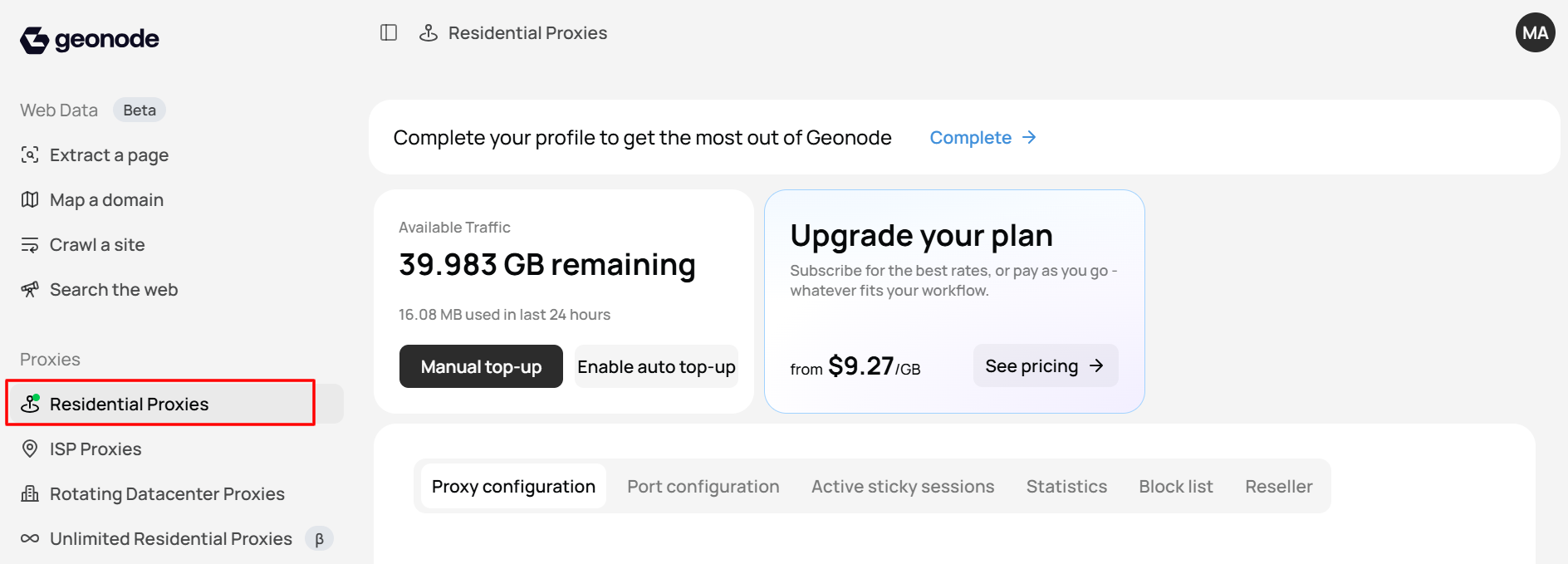
Residential Proxies → Proxy Configuration → Port Configuration → Country → State → City → Protocol → Session Type
In our dashboard, the port configuration screen allowed us to select:
- country targeting;
- state targeting;
- city targeting;
- HTTP/HTTPS or SOCKS5; and
- rotating or sticky session type.
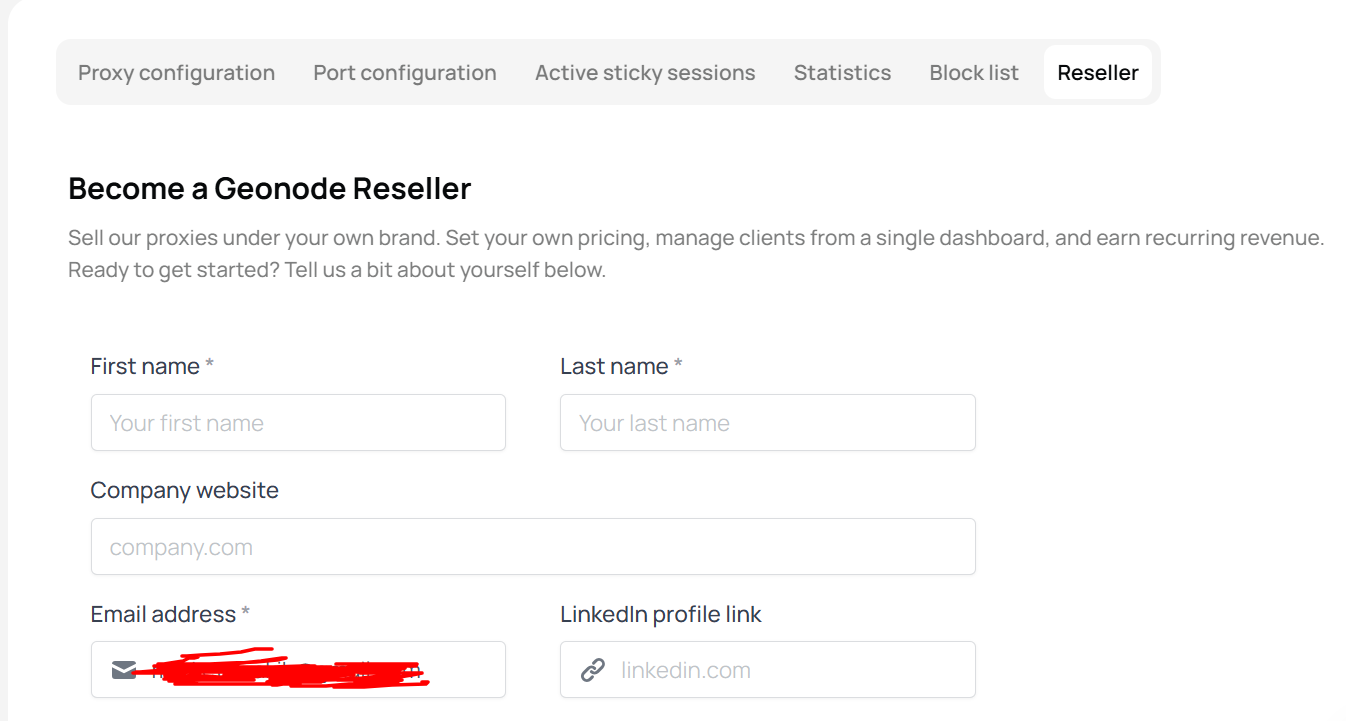
Geonode also includes tabs for Active Sticky Sessions, Statistics, Block List, and a Reseller area. This makes it easier to monitor usage, manage long-lived sessions, and configure location-specific ports without editing every setting manually.
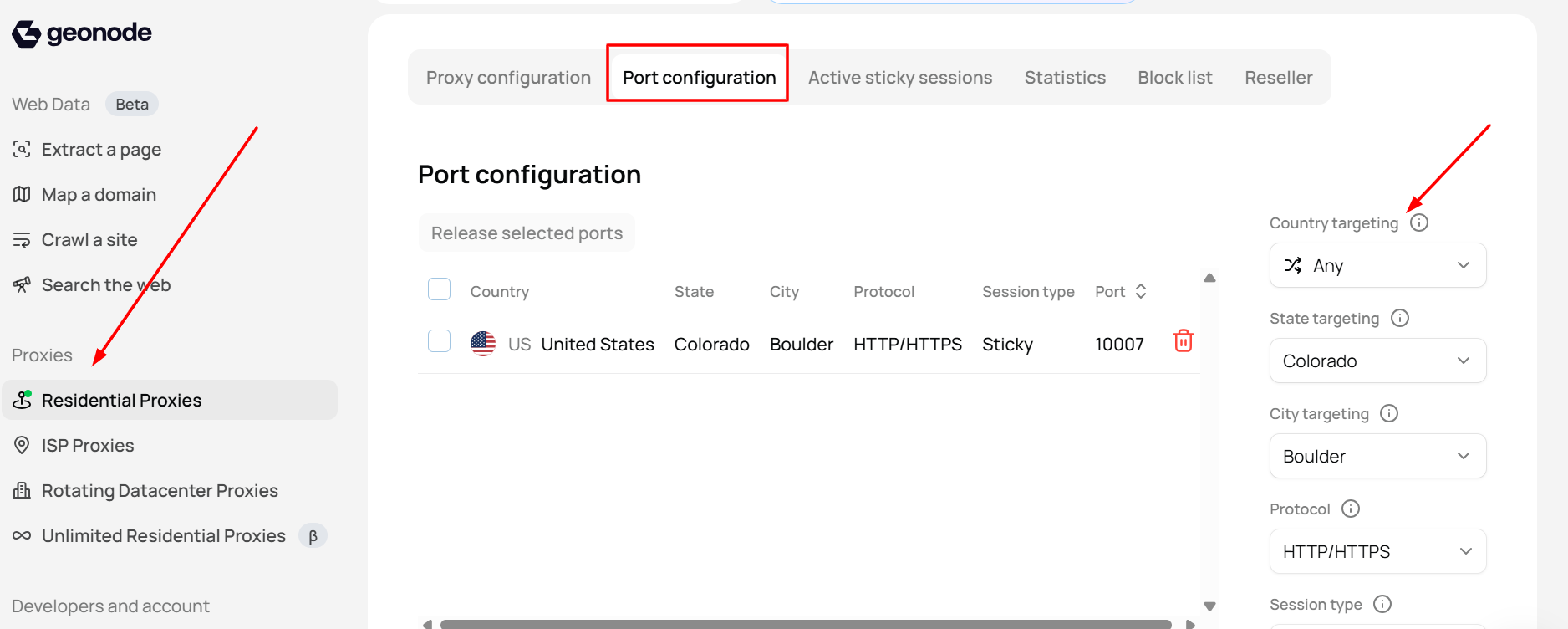
Your screenshots can be placed after this section to show the traffic dashboard, pricing plans, proxy configuration screen, and port-level targeting controls.
Geonode also offers separate products for ISP proxies, rotating datacenter proxies, unlimited residential proxies, and web-data tools. Those products should not be confused with the bandwidth-based residential proxies tested in this review.
Geonode Price
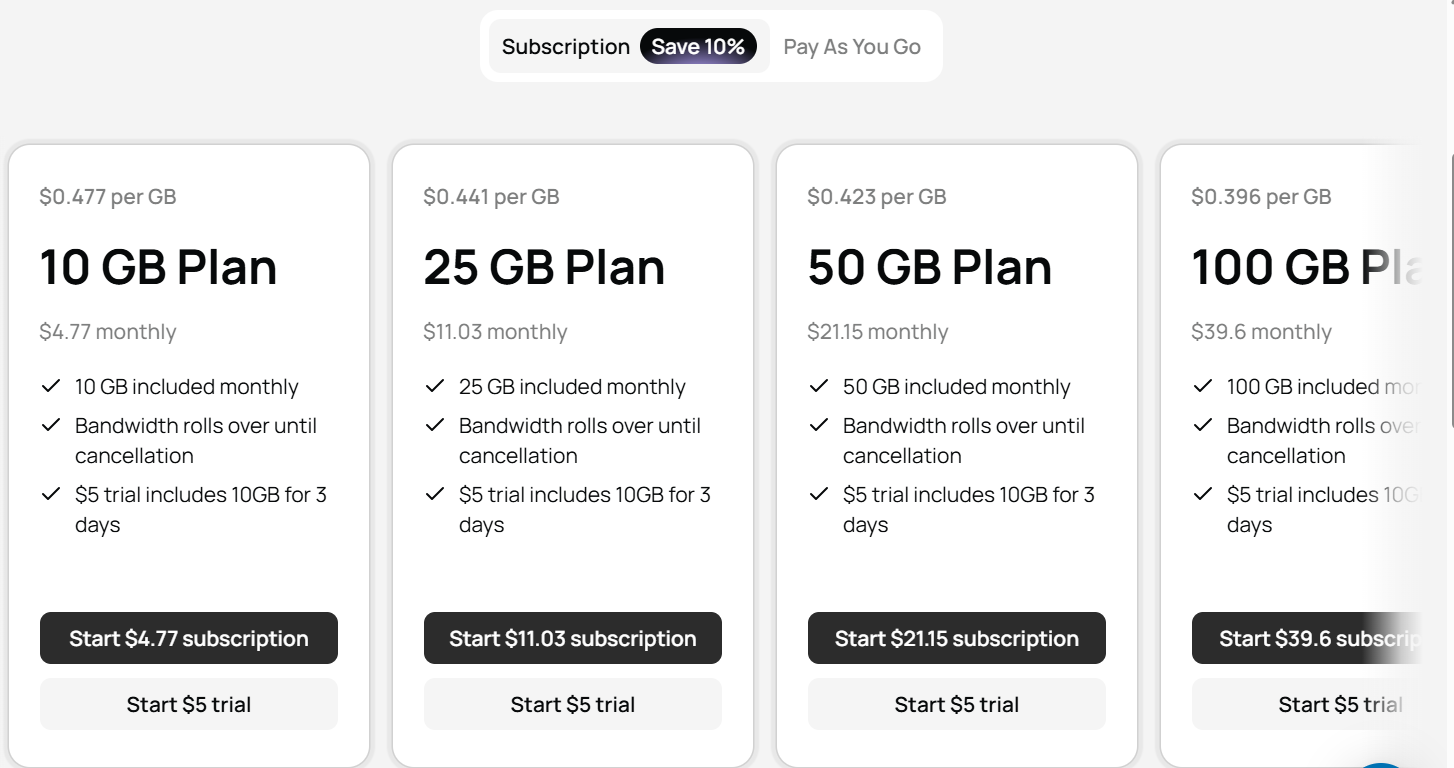
Become a Geonode Reseller
Rotating vs Sticky Sessions
Geonode supports both rotating and sticky residential proxy sessions. The right choice depends on whether your task needs a new identity for each request or the same IP for multiple requests.
Rotating proxies
With rotating mode enabled, Geonode assigns a new residential IP for each request.
This is useful for workloads such as:
- public web-data collection;
- price monitoring;
- SERP research;
- market research; and
- geo-testing.
Rotating IPs help spread requests across the residential network instead of sending all traffic from one IP address.
Sticky proxies
Sticky sessions keep the same residential IP for a selected period. In Geonode’s dashboard, you can choose sticky as the session type and monitor active sticky sessions separately.
Sticky sessions are better for tasks where a website expects the same visitor identity across several requests, such as:
- multi-step browsing sessions;
- login flows where permitted;
- cart or checkout testing;
- account-based workflows; and
- collecting multiple pages from the same session.
For broad collection tasks, rotating proxies are usually the better choice. For session-based tasks, use a sticky session and set reasonable timeouts and retries, since our benchmark recorded one unusually long response.
Geonode Residential Proxies Pros and Cons
Pros
- 98.80% success rate in our 1,000-request test
- Only 12 failures in 1,000 requests
- Country/region/city targeting
- HTTP(S) and SOCKS5 support
- Rotating and sticky sessions
Cons
- One request took 1,796.54 seconds, showing significant response-time variability
- The 3.12-second average does not reflect consistent speed on every request
- Best advertised per-GB rate requires high-volume purchasing
Who Should Consider Geonode Residential Proxies?
Geonode is worth considering for users who need a residential proxy network with good request completion, flexible location targeting, and both rotating and sticky sessions.
It may be a good fit for:
- web scraping and public-data collection projects that can retry occasional failed requests;
- price monitoring across countries, states, and cities;
- SERP tracking and local SEO research;
- ad verification and geo-specific content checks;
- market research and e-commerce monitoring;
- developers who need HTTP(S) or SOCKS5 support; and
- teams that want to manage ports, sticky sessions, usage, and block lists from one dashboard.
Our test result of 988 successful requests out of 1,000 makes Geonode a practical option for many general scraping and automation workflows.
However, it is less suitable for tasks where every request must return within a strict time limit. We recorded one extreme slow response in our benchmark, so use request timeouts and retry logic for production workloads.
Geonodep vs Other Static Residential Proxy Providers
The table below compares Geonode with several established residential proxy providers. Prices are advertised starting rates and can change by plan, traffic volume, and promotional offer.
Provider | IP Pool | Starting Price |
|---|---|---|
Geonode | 30–50M unique residential IPs rotating monthly | From $0.27/GB at high volume |
Geonode | 30M+ advertised residential IPs | $4/GB |
Bright Data | 400M+ | From $8/GB |
Oxylabs | 175M+ highest quality | From $6/GB |
Decodo | 115M+ advertised residential IPs | From $3.75/GB |
NodeMaven | 30M+ advertised residential IPs | From $2.20/GB |
Final Verdict & Scorecard
Category | Score | Why |
Success Rate | 4.8/5 | 988 / 1,000 requests succeeded (98.80%) |
Reliability | 4.7/5 | Only 12 / 1,000 requests failed (1.20%) |
Speed | 3.6/5 | 3.12s average, but one extreme slow-response outlier |
Pricing | 4.8/5 | Advertised volume pricing from $0.27/GB |
Setup & Dashboard | 4.7/5 | Clear controls for ports, targeting, sessions, and usage |
Overall Rating:  4.5 / 5 — Very Good
Geonode is a strong option for users who want reliable residential proxy completion, flexible country/state/city targeting, and competitive high-volume pricing. Our benchmark completed 98.80% of requests successfully.
The main limitation is response-time consistency. For time-sensitive work, set request timeouts and retries before using it at scale.
Frequently Asked Questions (FAQs)
In our 1,000-request benchmark, Geonode completed 988 requests and recorded 12 failures, for a 98.80% success rate. This is a strong result for many scraping, research, and automation tasks.
Geonode averaged 3.12 seconds per request. The fastest request completed in 0.40 seconds, but one request took 1,796.54 seconds, so response times were not fully consistent.
Yes. Geonode supports rotating sessions that assign a new IP per request, as well as sticky sessions that keep the same IP for a selected time.
Geonode supports targeting by country, state/region, and city. Location availability can vary depending on the selected area.
Author
Jayden Sprent (Proxy Specialist)
Hi, I'm Jayden Sprent. Dive into the world of proxy servers with my expert evaluations and insightful analyses based on thorough research. I'll share my experiences and comprehensive guides to help you make informed decisions about proxy services.
Learn More About Jayden Sprent