
Buyresidentialproxy / Reviews / Quanticdata Residential Proxies

Quanticdata Review
Quanticdata Residential Proxies Review (2026): Our Hands-On Test
Sponsored Review: This review was sponsored by QuanticData. We tested its Residential Premium proxies across 5,000 requests and reported the results based on our testing. Sponsorship does not influence our benchmark results or editorial conclusions.

Rating 4.7 / 05
We tested QuanticData residential proxies across 5,000 requests in five separate benchmark runs to evaluate connection reliability, response times, IP rotation, and geographic targeting accuracy.
Out of 5,000 requests, 4,982 succeeded and 18 failed, resulting in a 99.64% overall success rate. The combined average response time was approximately 1.98 seconds, with individual responses ranging from 1.29 to 15.49 seconds.
Four of our five tests used between 991 and 996 unique IP addresses per 1,000 requests, demonstrating extensive IP rotation. The fifth test produced a different result, with just three unique IPs handling 995 successful requests.
We also checked geographic distribution. Out of 4,982 successful requests, 4,980 were identified as originating from the United States. Only two successful requests returned IP addresses associated with other countries.
These results make QuanticData a promising option for users who need reliable residential connections, US geographic targeting, and flexible IP rotation.
However, the results also reveal limitations worth considering, particularly occasional slower responses, two geographic mismatches, and differences in IP reuse between test runs.
In this review, we examine our complete benchmark results, QuanticData's residential proxy features, pricing, dashboard, setup process, and practical advantages and disadvantages.
QuanticData 5,000-Request Success Rate
To evaluate QuanticData's residential proxy performance, we completed five separate benchmark runs, each containing 1,000 requests.
Our primary measurements included successful connections, failed requests, response times, unique IP addresses, and exit-IP country distribution.
Across all five tests, QuanticData maintained a success rate between 99.50% and 99.90%.
The second test delivered the highest reliability, with 999 successful requests and only one failure.
Meanwhile, the fifth test recorded the fastest average response time at 1.84 seconds, although it used considerably fewer unique IP addresses than the other runs.
#1 QuanticData Testing Result
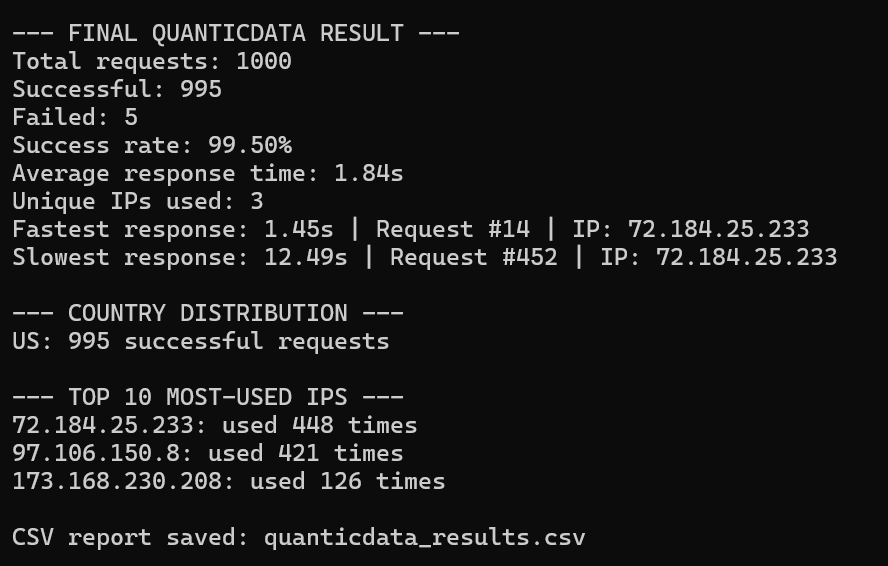
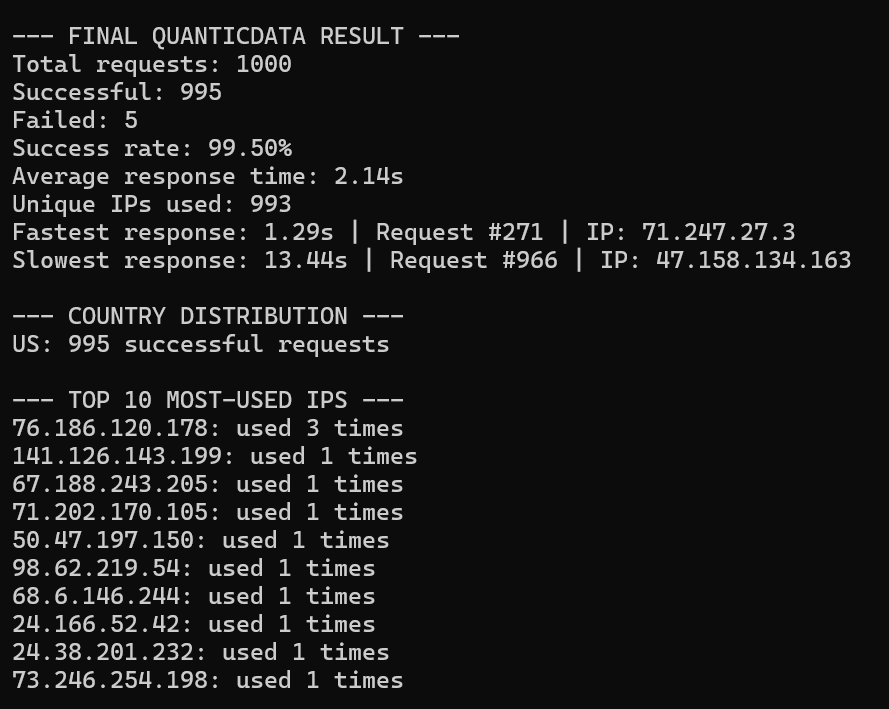
- Total Requests: 1,000
- Successful Requests: 995
- Failed Requests: 5
- Success Rate: 99.50%
- Average Response Time: 2.14 seconds
- Unique IPs Used: 993
- Fastest Response: 1.29 seconds
- Slowest Response: 13.44 seconds
All 995 successful requests were associated with US IP addresses.
One notable observation was the number of unique IPs. We recorded 993 different addresses across the successful requests, with very little repetition.
This suggests that the proxy configuration provided extensive IP rotation during the first benchmark.
Despite the strong success rate, the slowest response reached 13.44 seconds, indicating that individual requests can occasionally take considerably longer than average.
#2 QuanticData Testing Result
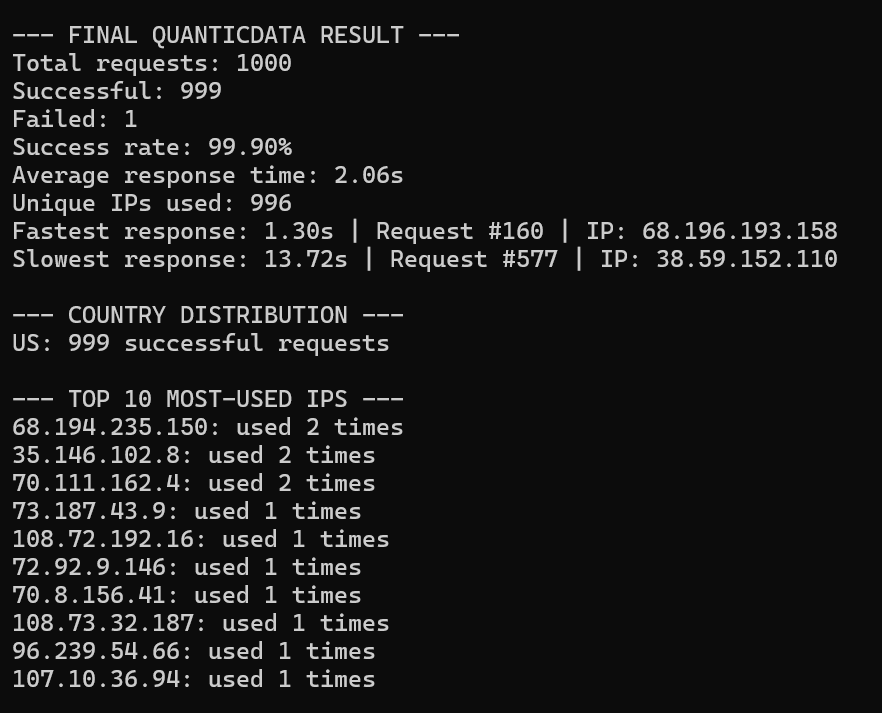
Our second benchmark produced the strongest connection reliability of all five tests.
Results:
- Total Requests: 1,000
- Successful Requests: 999
- Failed Requests: 1
- Success Rate: 99.90%
- Average Response Time: 2.06 seconds
- Unique IPs Used: 996
- Fastest Response: 1.30 seconds
- Slowest Response: 13.72 seconds
All 999 successful requests returned US-located IP addresses.
We recorded 996 unique IPs, with only a few addresses appearing more than once.
Compared with the first test, the success rate improved from 99.50% to 99.90%, while the average response time decreased from 2.14 to 2.06 seconds.
The combination of high reliability and extensive IP rotation made this the strongest overall run for connection consistency.
However, the slowest request still required 13.72 seconds.
#3 QuanticData Testing Result
The third benchmark focused on the same core performance measurements.
Results:
- Total Requests: 1,000
- Successful Requests: 998
- Failed Requests: 2
- Success Rate: 99.80%
- Average Response Time: 1.90 seconds
- Unique IPs Used: 995
- Fastest Response: 1.29 seconds
- Slowest Response: 15.49 seconds
This test recorded 996 successful connections from the United States. Two additional successful requests were associated with Finland and the Dominican Republic.
Although the test achieved a 99.80% connection success rate, the two non-US results are important because we were evaluating US geographic targeting. The run also recorded the slowest individual response across the entire benchmark: 15.49 seconds.
Nevertheless, the average response time improved to 1.90 seconds, making it faster on average than the first two runs. The third test demonstrates why connection success, response time, and geographic accuracy should be evaluated separately.
A proxy can successfully complete a request while still returning an unexpected exit location.
#4 QuanticData Testing Result
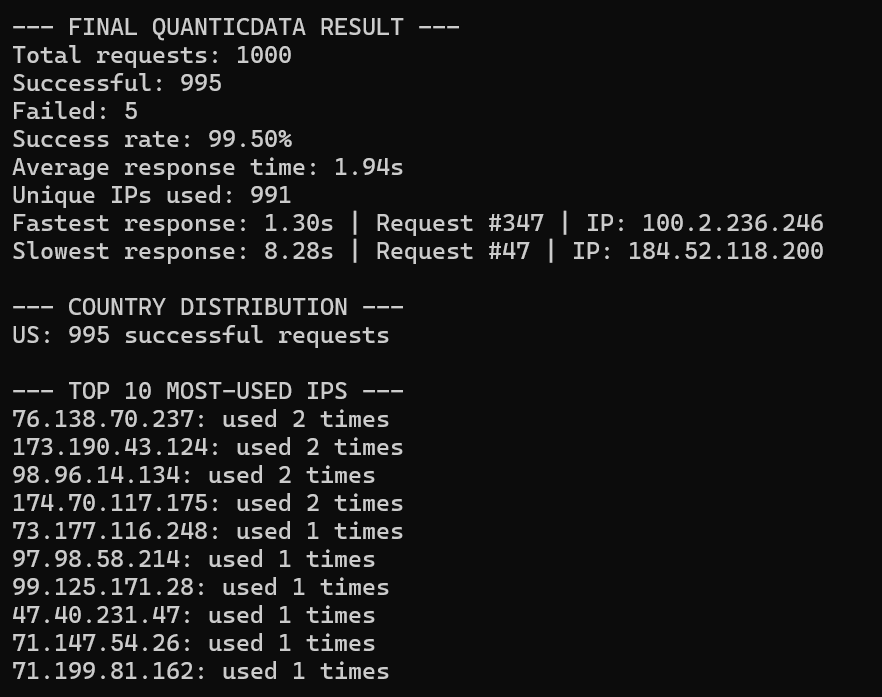
Our fourth benchmark delivered another consistent result.
Results:
- Total Requests: 1,000
- Successful Requests: 995
- Failed Requests: 5
- Success Rate: 99.50%
- Average Response Time: 1.94 seconds
- Unique IPs Used: 991
- Fastest Response: 1.30 seconds
- Slowest Response: 8.28 seconds
All 995 successful requests were associated with US IP addresses.
The test used 991 unique IPs, continuing the extensive rotation pattern observed in the previous three runs.
One positive finding was the lower maximum response time. The slowest request took 8.28 seconds, considerably less than the maximum recorded in the first three benchmarks.
Although the success rate remained at 99.50%, the average response time of 1.94 seconds was competitive with the earlier results.
#5 QuanticData Testing Result
The fifth benchmark delivered our fastest average response time but showed a significantly different IP reuse pattern.
Results:
- Total Requests: 1,000
- Successful Requests: 995
- Failed Requests: 5
- Success Rate: 99.50%
- Average Response Time: 1.84 seconds
- Unique IPs Used: 3
- Fastest Response: 1.45 seconds
- Slowest Response: 12.49 seconds
All 995 successful requests used US IP addresses. Unlike the previous tests, which returned hundreds of unique addresses, the fifth test used only three IPs.
QuanticData Test Results at a Glance
Metric | Test #1 | Test #2 | Test #3 | Test #4 | Test #5 | Overall |
|---|---|---|---|---|---|---|
Total Requests | 1,000 | 1,000 | 1,000 | 1,000 | 1,000 | 5,000 |
Successful Requests | 995 | 999 | 998 | 995 | 995 | 4,982 |
Failed Requests | 5 | 1 | 2 | 5 | 5 | 18 |
Success Rate | 99.50% | 99.90% | 99.80% | 99.50% | 99.50% | 99.64% |
Average Response Time | 2.14s | 2.06s | 1.90s | 1.94s | 1.84s | 1.98s |
Fastest Response | 1.29s | 1.30s | 1.29s | 1.30s | 1.45s | 1.29s |
Slowest Response | 13.44s | 13.72s | 15.49s | 8.28s | 12.49s | 15.49s |
Overall Findings
Across 5,000 requests, QuanticData delivered a 99.64% success rate with an approximately 1.98-second average response time.
The combined average was calculated from the five reported run averages, with each run containing 1,000 requests.
Our results indicate strong connection reliability in the tested environment.
An important distinction is that the unique-IP figures cannot simply be added together to determine the number of globally unique addresses across all five tests. The same IP could have appeared in multiple runs.
We also observed differences between individual response times. While the average remained below two seconds, a small number of requests took considerably longer.
Users running time-sensitive automation should account for these occasional delays.
Quanticdata Residential Proxy Overview
Feature | Quanticdata Specification |
|---|---|
Proxy Type | Premium Residential proxies |
Advertised IP Pool | 90 million+ residential IPs |
Main Use Cases | Web scraping, SEO rank tracking, browser automation, price monitoring, and market research |
Billing Model | Pay-as-you-go bandwidth packages |
Bandwidth Expiration | 30–360 days (Basic); 30–90 days (Premium) |
Free Trial | 100 MB for 5 days (Residential Basic; SMS verification required) |
IP Rotation | Rotating and sticky sessions |
Geographic Targeting | Country, region, city, and ISP targeting |
Quanticdata Residential Proxy Pros and Cons
Pros
- QuanticData completed 4,982 successful requests out of 5,000, achieving a 99.64% overall success rate.
- The combined average response time was approximately 1.98 seconds. Every individual test recorded an average below 2.15 seconds.
- Our first four runs each recorded more than 990 unique IPs per 1,000 requests, indicating substantial IP diversity during those sessions.
- Approximately 99.96% of successful requests were associated with US-located IP addresses.
- The platform supports rotating and sticky sessions, geographic targeting, and multiple proxy protocols.
Cons
- Although average response times were consistently low, individual requests took up to 15.49 seconds.
- Two successful requests in the third test returned IP locations outside the United States.
- Bandwidth is valid for a specified plan term rather than indefinitely.
QuanticData Dashboard & Setup Experience
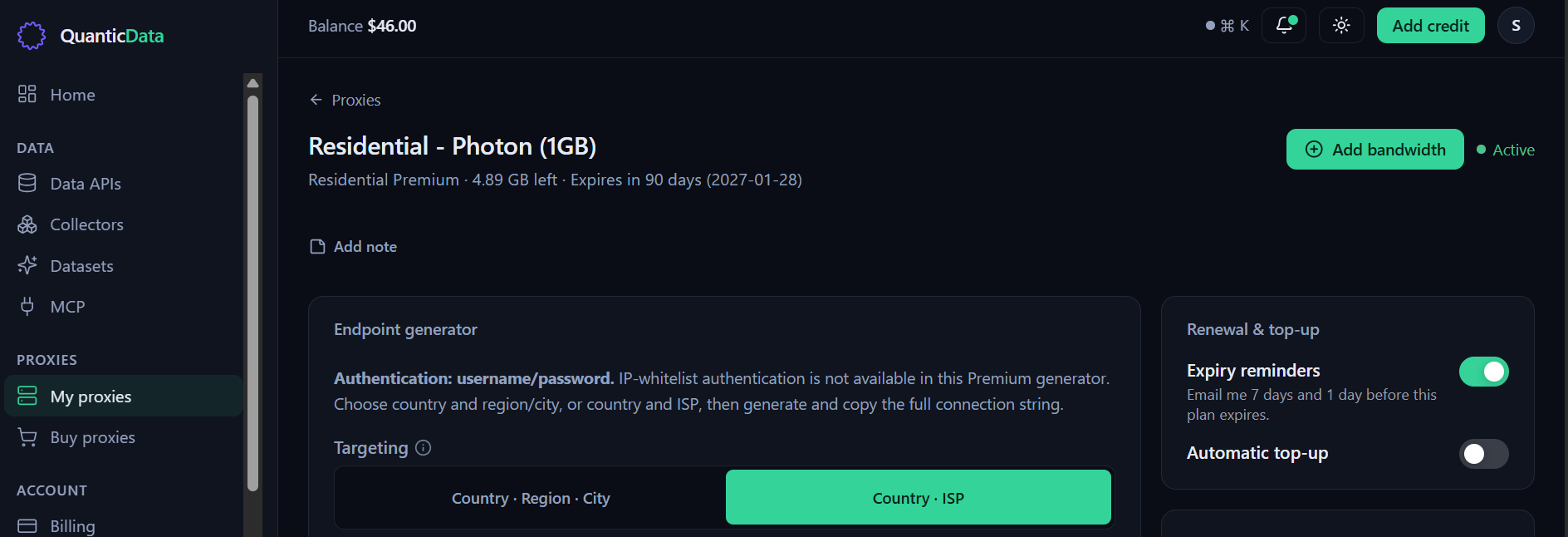
QuanticData provides a dark-themed dashboard with controls for managing proxy bandwidth, generating endpoints, and monitoring account status.
During our review, the dashboard displayed the Residential Premium product, the available bandwidth balance, and the expiration date.
The interface also included options for adding bandwidth and configuring renewal preferences. One of the most useful dashboard features is the endpoint generator.
Instead of manually constructing every proxy connection string, users can choose targeting options and generate credentials. The Premium generator displayed two targeting modes:
Country → Region → City
This option allows users to select a country and narrow their connection settings to a more specific geographic area.
Country → ISP
This option allows users to select a country and an available internet service provider.
These controls may be useful for regional research, localized website testing, and applications that require particular ISP characteristics.
The dashboard also identifies username/password authentication as the available method for the Premium generator. IP-whitelist authentication was not available in the Premium generator shown in our screenshot.
How to Set Up QuanticData Residential Proxies
Step 1: Create an Account
Visit QuanticData and create an account to access the dashboard and available proxy products.
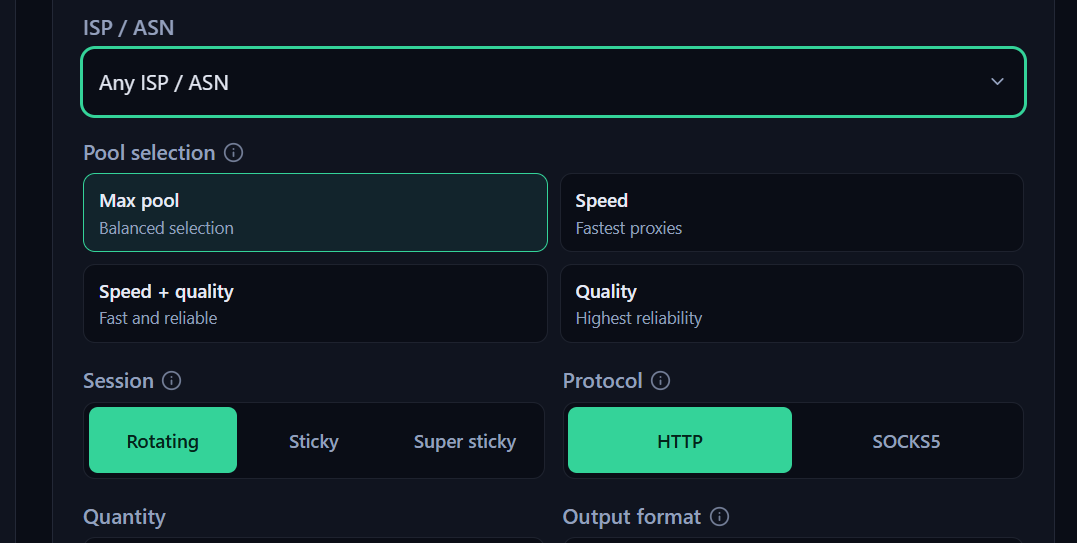
Step 2: Select Residential Premium
Choose the Residential Premium product and purchase an appropriate bandwidth package. For smaller tests, the Photon package provides an entry-level option.
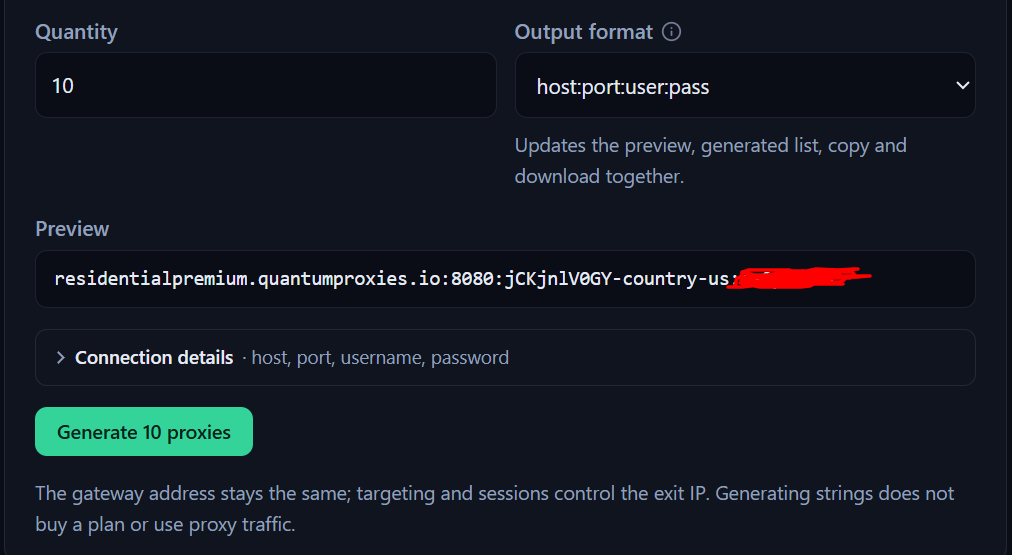
Step 3: Open the Endpoint Generator
Navigate to your residential proxy configuration page. The endpoint generator allows you to select the available targeting options.
Step 4: Configure Geographic Targeting
Choose your preferred country and either region/city or ISP targeting, depending on your requirements.
Step 5: Generate Your Connection Details
Use the dashboard to generate the connection string. Copy the proxy host, port, username, and password into your compatible browser, script, or automation tool.
Step 6: Choose Your Proxy Plan
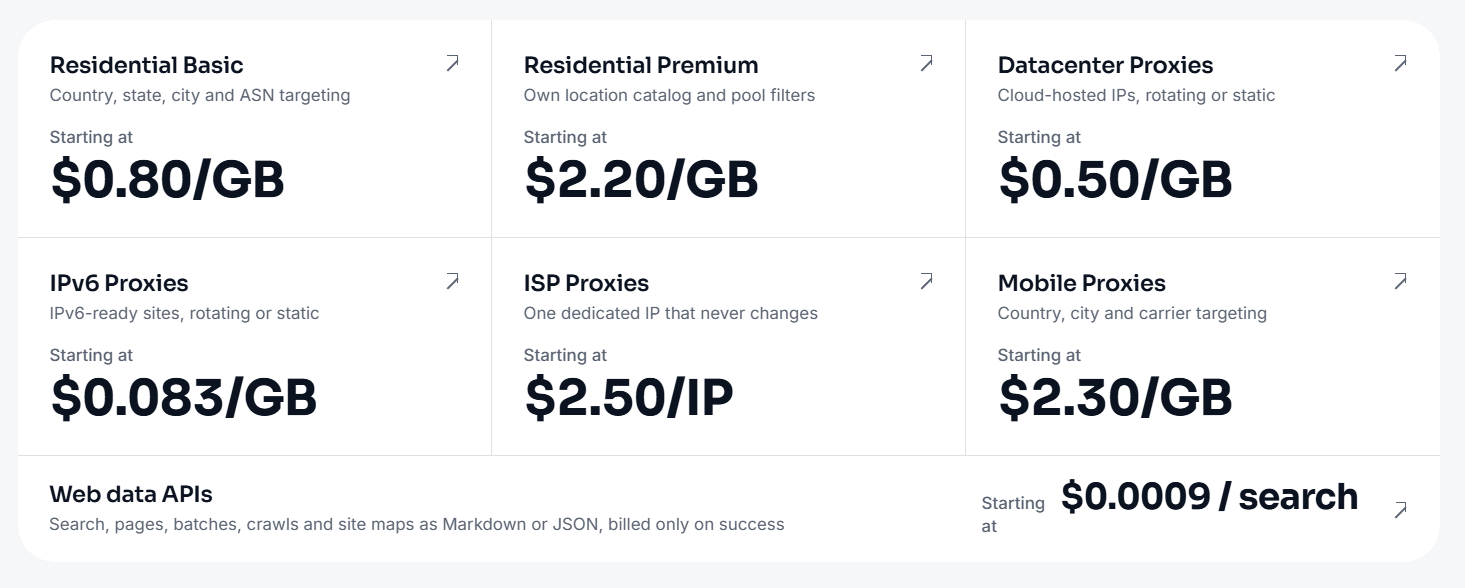
QuanticData offers six proxy networks with flexible, usage-based pricing. Residential Premium starts at $4/GB, while Residential Basic starts at $1/GB. Larger packages offer lower per-GB rates.
Proxy Type | Starting Price |
|---|---|
Residential Basic | $1.00/GB |
Residential Premium | $4.00/GB |
Mobile 4G/5G | $5.00/GB |
Datacenter | $0.80/GB |
ISP (Static Residential) | $3.80/IP per 30 days |
IPv6 | $0.20/GB |
For our 5,000-request benchmark, we used Residential Premium.
Step 7: Add Credit and Make Payment
QuanticData allows users to add credit with a minimum deposit of $5. You can choose $25, $50, $100, or $250, or enter a custom amount.
The platform supports three payment methods:
- PayPal
- Credit/Debit Card, including Apple Pay and Google Pay
- Cryptocurrency, displayed with a No VAT option
After adding credit, you can purchase your preferred proxy package directly from the dashboard.
Quanticdata vs Other Residential Proxy Providers: Comparison
| Provider | Residential IP Pool | Starting Price | Best For |
|---|---|---|---|
| Quanticdata | 90M+ | Basic at $1GB & pro $4 | Budget users |
| Proxylane | 28M+ | $1.95 / GB | Budget users |
| Bright Data | 400M+ | $5–8 / GB | Enterprise scraping |
| Oxylabs | 175M+ | $6–8 / GB | Large-scale data collection |
| Decodo | 115M+ | $3/GB | Balanced price/performance |
Final Verdict & Scorecard
QuanticData performed well in our 5,000-request residential proxy benchmark.
Its 99.64% success rate demonstrates strong connection reliability, while its 1.98-second average response time suggests responsive performance for the workloads we tested.
The service also offers useful product features, including geographic targeting, rotating and sticky sessions, and separate Basic and Premium residential packages.
QuanticData Scorecard
Category | Score | Why |
|---|---|---|
Success Rate | 4.9/5 | 4,982 of 5,000 requests succeeded |
Reliability | 4.8/5 | Every test achieved at least 99.50% success |
Speed | 4.6/5 | 1.98-second average with occasional slower responses |
Pricing | 4.5/5 | Competitive Basic rates, with higher Premium pricing |
Setup & Dashboard | 4.7/5 | Clear endpoint generator and useful targeting controls |
 Overall Rating: 4.7 / 5
The rating is the rounded, equal-weight average of our five editorial category scores. It is an assessment of the reviewed service, not an independent third-party rating.
Frequently Asked Questions (FAQs)
QuanticData performed well in our benchmark, successfully completing 4,982 of 5,000 requests. It achieved a 99.64% success rate and an approximately 1.98-second average response time. Results may differ on other websites and configurations.
Our five benchmark runs recorded success rates between 99.50% and 99.90%. The combined success rate was 99.64%.
The average response time across our five tests was approximately 1.98 seconds. The fastest recorded response was 1.29 seconds, while the slowest reached 15.49 seconds
The first four runs recorded 993, 996, 995, and 991 unique IP addresses, respectively. The fifth run used only three unique addresses. We cannot determine the number of unique IPs across all five runs without comparing the full IP logs.
Yes. QuanticData advertises rotating residential proxy sessions. Our first four tests showed extensive IP rotation, with more than 990 unique addresses in each 1,000-request benchmark.
Yes. QuanticData offers sticky-session configurations. However, our benchmark screenshots do not independently establish the maximum supported session duration or confirm whether sticky mode was active in the fifth test.
Yes. QuanticData provides US residential proxy targeting. In our benchmark, 4,980 of 4,982 successful requests returned US-located IP addresses.
QuanticData Basic residential proxies start at $1 per GB and decrease to $0.80 per GB with its largest advertised package. Premium starts at $4 per GB and decreases to $2.20 per GB at higher volumes.
100 MB of Residential Basic for 5 days, with SMS verification and no card required.
Yes. Purchased bandwidth has a defined validity period depending on the plan. Buyers should check the expiration date shown at checkout and in their dashboard.
QuanticData offers residential proxies that may be used for e-commerce data collection. However, the supplied benchmark screenshots do not identify the destination websites, so our 5,000-request results should not be presented as a verified Amazon-specific success rate.
QuanticData offers geographic targeting and rotating connections relevant to SEO monitoring. However, we have not established a Google SERP-specific success rate or CAPTCHA rate from these benchmark screenshots.
Explore Alternatives to QuanticData
iproyal Review
DataImpulse Review
proxys Review
Decodo Review
Reviews proxylane
Author
Jayden Sprent (Proxy Specialist)
Hi, I'm Jayden Sprent. Dive into the world of proxy servers with my expert evaluations and insightful analyses based on thorough research. I'll share my experiences and comprehensive guides to help you make informed decisions about proxy services.
Learn More About Jayden Sprent