
Buyresidentialproxy / Reviews / Dataimpulse Residential Proxies

Dataimpulse Review
Dataimpulse Residential Proxies Review (2026): Our Hands-On Test

Rating 4.7 / 05
We purchased and tested DataImpulse residential proxies ourselves instead of relying only on advertised performance figures. In our 1,000-request benchmark, 999 requests succeeded and only 1 failed, producing a 99.90% success rate, with an average response time of 2.72 seconds.
Based on this test, DataImpulse delivered excellent connection reliability and strong overall speed. The result suggests that DataImpulse is a good choice for users who need affordable residential proxies without sacrificing dependable performance.
Test #1: DataImpulse 1,000-Request Success Rate
We sent 1000 requests through DataImpulse residential proxies and recorded every successful and failed request.
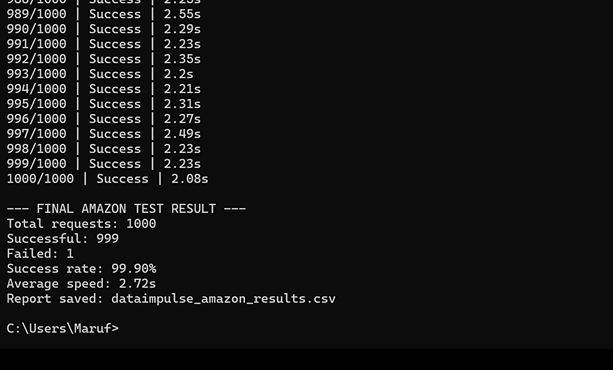
Results:
Successful: 999/1000
Failed: 1/1000
Success Rate: 99.90%
Failure Reasons:
Proxy Error, Disconnection
DataImpulse Test Results at a Glance
Metric | Our Test Result |
|---|---|
Total Requests | 1,000 |
Successful Requests | 999 / 1,000 |
Failed Requests | 1 / 1,000 |
Success Rate | 99.90% |
Failure Rate | 0.10% |
Average Response Time | 2.72 sec |
For residential proxies, a success rate above 95% is generally considered excellent. DataImpulse achieved a 100% success rate in our 1,000-request proxy test and 99.90% in our Amazon test, indicating highly reliable residential connections.
About DataImpulse residential proxy
DataImpulse offers affordable residential proxies for web scraping, automation, and public-data collection. According to the provider, it has 90M+ residential IPs across 195+ countries.
Plans start at $1/GB with non-expiring traffic. DataImpulse supports HTTP(S), SOCKS5, rotating sessions, sticky sessions, and location targeting.
It is a practical choice for budget-friendly web scraping, SEO monitoring, market research, and ad verification.
Dataimpulse Residential Proxy Overview
Feature | DataImpulse Specification |
|---|---|
IP Pool | 90M+ |
Countries | 195+ countries |
Geo Targeting | Country targeting included; city, ZIP, and ASN targeting available |
Rotation | Rotating + sticky sessions |
Protocols | HTTP, HTTPS & SOCKS5 |
Support | 24/7 human support |
Dataimpulse Residential Pros and Cons
Pros
- Extremely affordable residential proxies
- Large global IP pool
- Pay-as-you-go bandwidth model
Cons
- Fewer enterprise tools compared with premium providers
- Performance may vary depending on location
DataImpulse Dashboard & Setup Experience
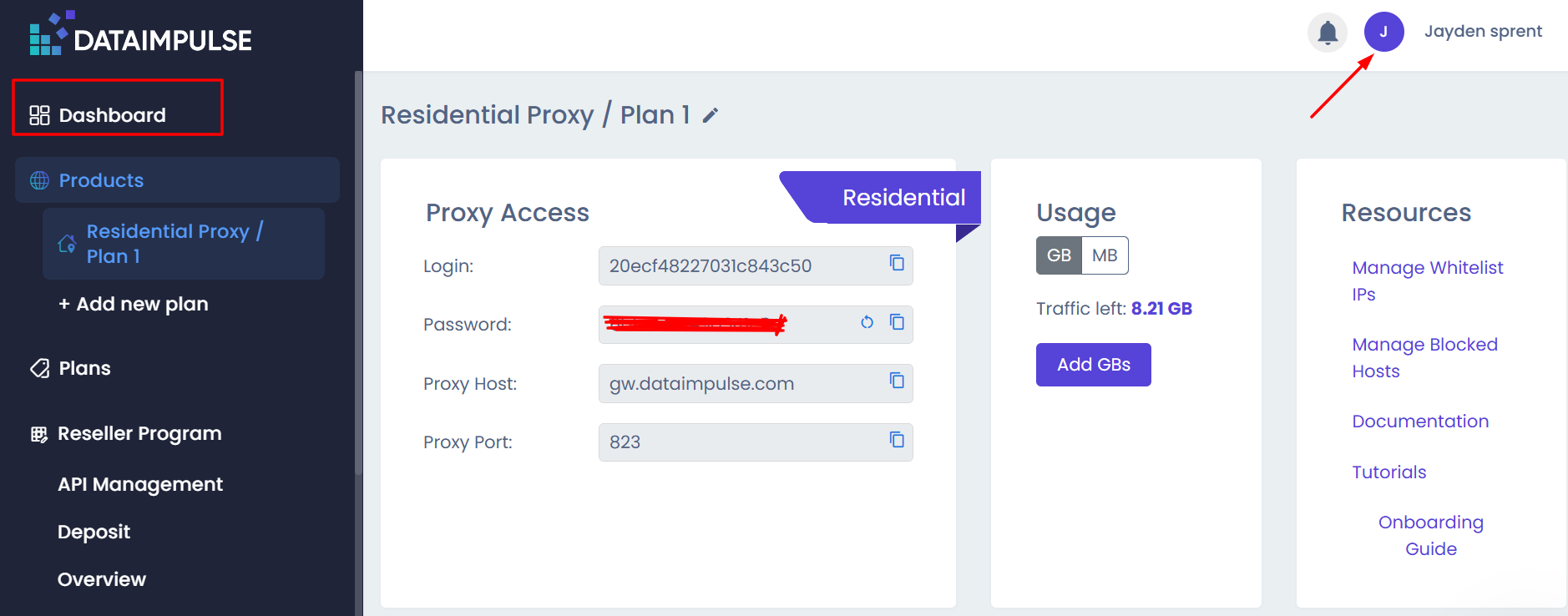
DataImpulse has a clean dashboard where users can view their residential proxy plan, remaining traffic, login credentials, proxy host, and port in one place. The dashboard also provides quick access to whitelist IPs, blocked-host controls, documentation, tutorials, and the onboarding guide.
After purchasing traffic, users can create a proxy configuration and copy the generated connection details into their browser, scraping tool, or code.
How to Set Up DataImpulse Residential Proxies
Step 1: Open your residential proxy plan
From the dashboard, select Residential Proxy / Plan 1 under Products. Here, you can find your login, password, proxy host, port, and remaining traffic balance.
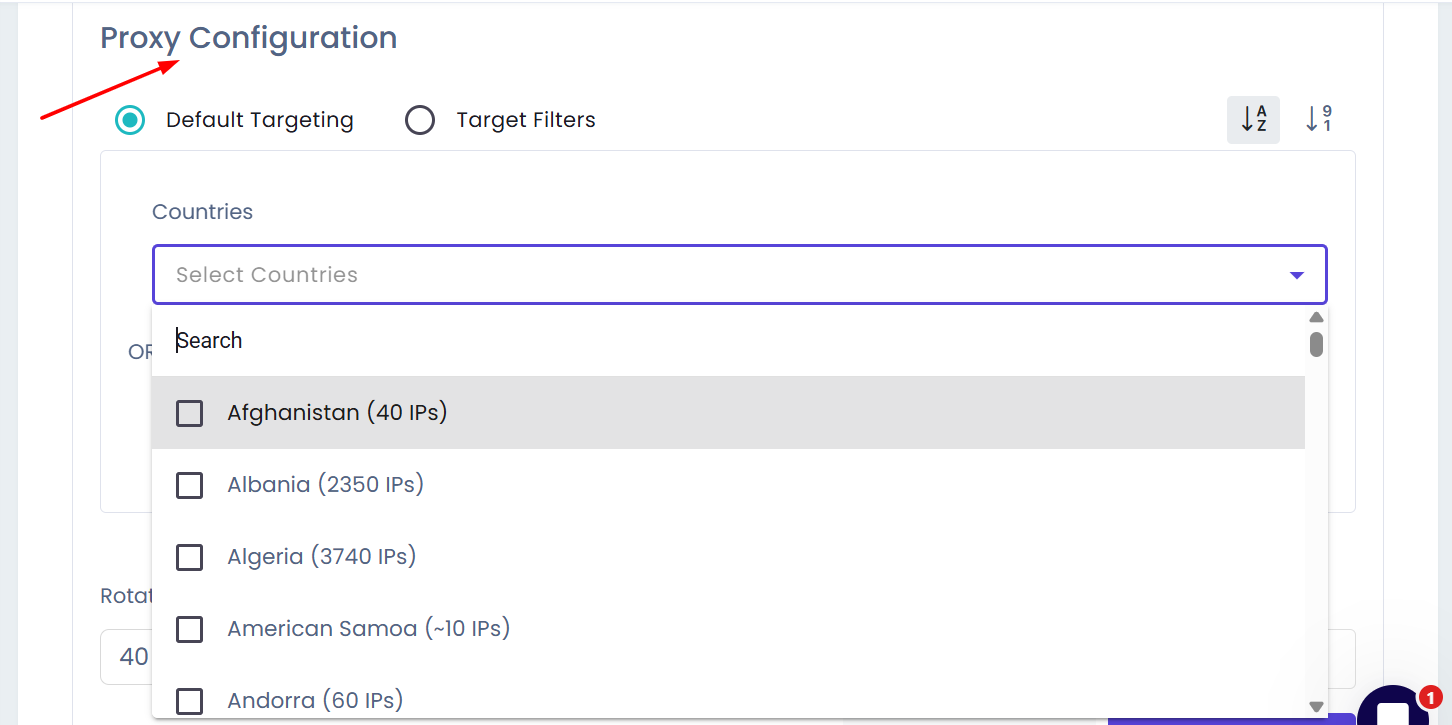
Step 2: Choose your proxy location
Open Proxy Configuration and select either Default Targeting or Target Filters. You can choose one or more countries from the available list. The dashboard also displays the approximate available IP count for each country.
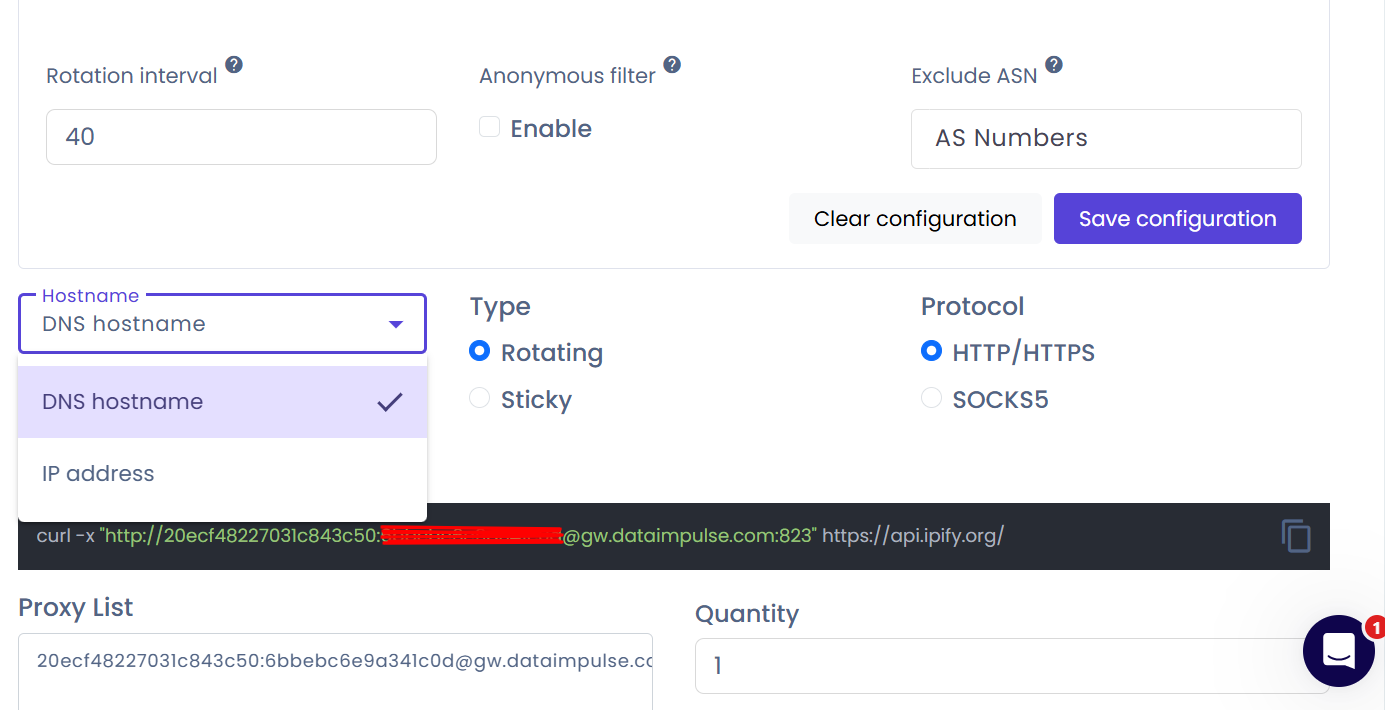
Step 3: Configure rotation and filtering
Set the rotation interval based on your task. The configuration page also includes an anonymous filter and an option to exclude specific ASNs when needed.
Step 4: Select connection type and protocol
Choose between:
- Rotating — for requests that need IP changes over time
- Sticky — for tasks that need to keep the same IP session
Then select either HTTP/HTTPS or SOCKS5 as your connection protocol.
Step 5: Generate and copy the proxy connection
Choose whether to use a DNS hostname or IP address, save the configuration, and copy the generated proxy string or cURL command. You can then paste it into your preferred tool, browser profile, or script.
DataImpulse vs Other Residential Proxy Providers: Comparison
| Provider | Residential IP Pool | Starting Price | Best For |
|---|---|---|---|
| DataImpulse | 90M+ | $1 / GB | Budget users |
| Bright Data | 400M+ | $5–8 / GB | Enterprise scraping |
| Oxylabs | 175M+ | $6–8 / GB | Large-scale data collection |
| Decodo | 115M+ | $3/GB | Balanced price/performance |
Final Verdict & Scorecard
Category | Score | Why |
|---|---|---|
Success Rate | 4.9/5 | 999 / 1,000 requests succeeded (99.90%) |
Reliability | 4.9/5 | Only 1 / 1,000 requests failed in our Amazon test (99.90%) |
Speed | 4.4/5 | 2.72 seconds average proxy-test response time |
Pricing | 4.9/5 | Starts at $1/GB, with non-expiring traffic |
Setup & Dashboard | 4.5/5 | Clear dashboard, flexible targeting, and easy proxy configuration |
 Overall Rating: 4.7 / 5
DataImpulse delivered excellent reliability in our 1,000-request benchmark, with only one failed request and a solid 2.72-second average response time. Its $1/GB starting price and non-expiring traffic make it a particularly strong option for budget-conscious scraping, SEO research, e-commerce monitoring, and market-research work.
Frequently Asked Questions (FAQs)
DataImpulse residential proxies are commonly used for web scraping, SEO monitoring, social media automation, and market research.
Residential proxies start at around $1 per GB using a pay-as-you-go model.
The provider reports access to more than 90 million residential IP addresses globally.
Yes. The platform supports automatic IP rotation and sticky sessions depending on the configuration.
Popular alternatives include:
Author
Jayden Sprent (Proxy Specialist)
Hi, I'm Jayden Sprent. Dive into the world of proxy servers with my expert evaluations and insightful analyses based on thorough research. I'll share my experiences and comprehensive guides to help you make informed decisions about proxy services.
Learn More About Jayden Sprent