
Buyresidentialproxy / Reviews / Gsocks Residential Proxy

gsocks Review
Gsocks Residential Proxies Review (2026): Our Hands-On Test
Rating 4.5 / 5
We purchased and tested GSocks residential proxies ourselves instead of relying only on advertised performance figures. In our 1,000-request benchmark, 998 requests succeeded and only 2 failed, producing a 99.8% success rate, with an average response time of 3.29 seconds.
Based on this test, GSocks delivered excellent connection reliability. The response time was usable rather than exceptionally fast, so our initial impression is that reliability is a bigger strength than raw speed.

GSocks Test Results at a Glance
Metric | Our Test Result |
Total Requests | 1,000 |
Successful Requests | 998 / 1,000 |
Failed Requests | 2 / 1,000 |
Success Rate | 99.8% |
Failure Rate | 0.2% |
Average Response Time | 3.29 sec |
We Purchased and Tested GSocks Ourselves
A proxy provider can advertise millions of IPs and a near-perfect success rate, but those numbers don't necessarily tell you what will happen when you actually send requests through its network.
That's why we took a different approach for this GSocks review.
We purchased residential proxy traffic, configured the proxies, and ran our own benchmark rather than simply repeating the specifications published on the GSocks website.
Our main performance benchmark consisted of 1,000 real requests.
We recorded:
- successful requests;
- failed requests;
- success rate;
- failure rate; and
- average response time.
The result was better than we expected in terms of connection reliability.
Test #1: GSocks 1,000-Request Success Rate
We sent 1000 requests through Gsocks residential proxies and recorded every successful and failed request.
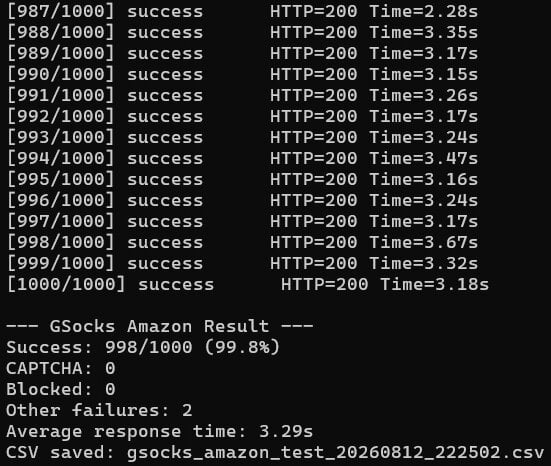
Results:
Successful: 998/1000
Failed: 2/1000
Success Rate: 99.8%
Failure Reasons
Proxy Error
Disconnection
For residential proxies, a success rate above 95% is generally considered excellent. Our testing result of 99.8% indicates high-quality, clean IPs.
Test #2: GSocks Response Time
Success rate tells us whether requests complete.
It doesn't tell us how long they take.
So we also recorded response time during our test.
Our Average Response Time: 3.29 Seconds
Across our benchmark, GSocks averaged 3.29 seconds per request.
We wouldn't describe this as extremely fast.
But speed needs context.
Residential proxies route traffic through residential devices rather than conventional datacenter infrastructure. Location, routing, the target server, and the quality of individual residential connections can therefore affect latency.
For our test, the more interesting finding was the combination of:
99.8% success rate + 3.29-second average response time
GSocks prioritized reliable completion in our benchmark, even though the average response wasn't among the fastest proxy speeds we've seen.
Speed verdict
Good — 4.0/5
For workloads where stability matters more than shaving every possible millisecond off a request, the result was reasonable.
For extremely latency-sensitive workloads, we'd compare this figure with other Residential Proxy providers before choosing GSocks solely for speed.
GSocks Residential Proxy Features
Now let's separate our test results from what GSocks itself currently advertises.
According to GSocks, its residential proxy product provides access to 30M+ IPs across 190+ countries, unlimited concurrent sessions, and country-, region-, and city-level targeting.
GSocks also says its residential IPs are sourced from consenting device owners.
These are provider-reported specifications. Our 1,000-request test verifies network performance in our test environment; it does not independently verify the size of the entire GSocks IP pool.
GSocks Residential Proxy Overview
Feature | GSocks Specification |
|---|---|
IP Pool | 30M+ advertised residential IPs |
Countries | 190+ |
Geo Targeting | Country, region & city |
Rotation | Rotating + sticky |
Concurrent Sessions | Unlimited |
Traffic Expiration | Does not expire |
Protocols | HTTP & SOCKS5 |
Starting Price | $4/GB for 1 GB |
Dashboard & Setup Experience
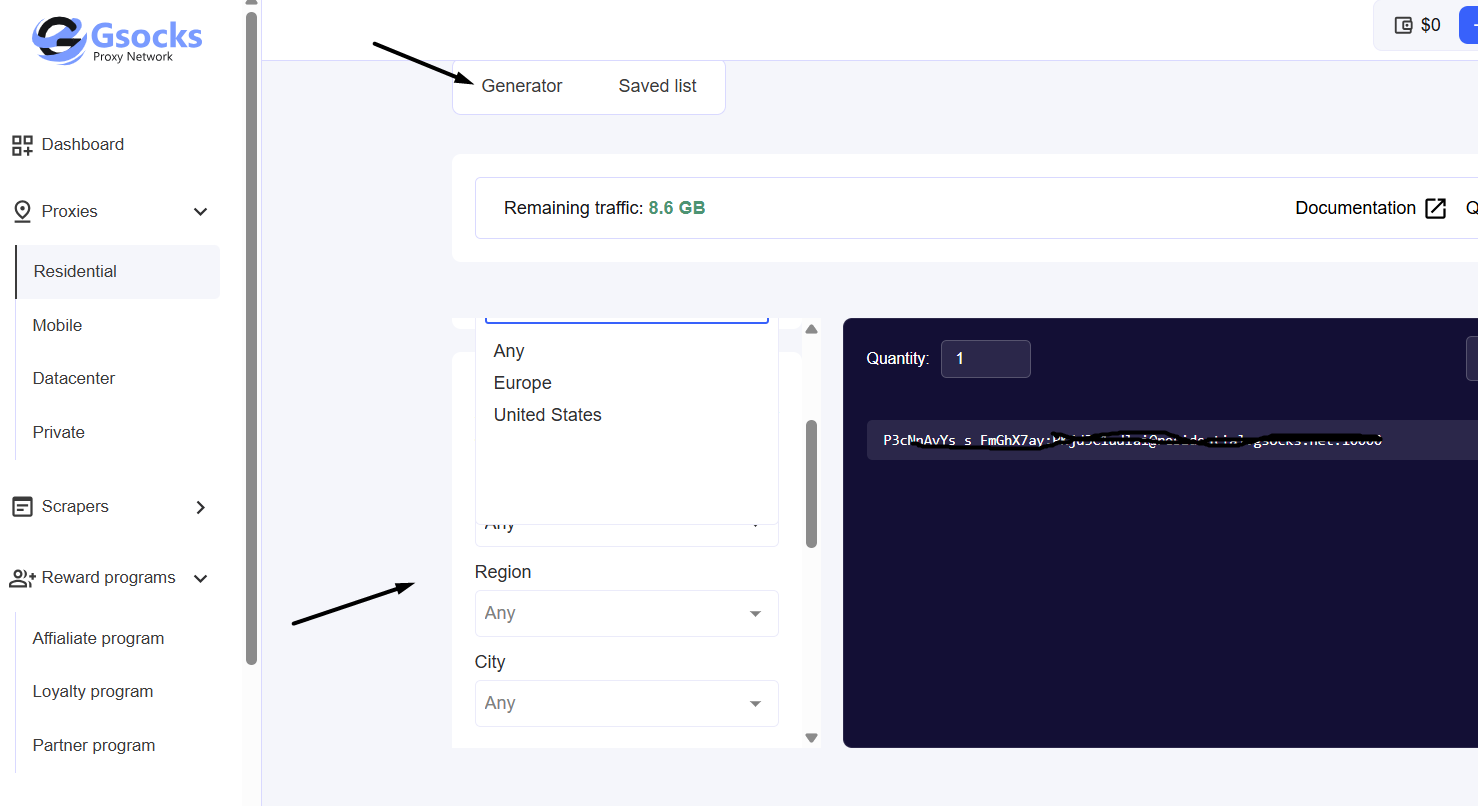
After purchasing residential traffic, GSocks provides a proxy generator inside the dashboard.
The generator allows users to configure proxies by criteria including:
Country → Region → City → Provider → Rotation
This is useful because not every proxy task needs the same type of IP.
For example, broad web scraping might only require country-level targeting, while geo-testing may require a specific city.
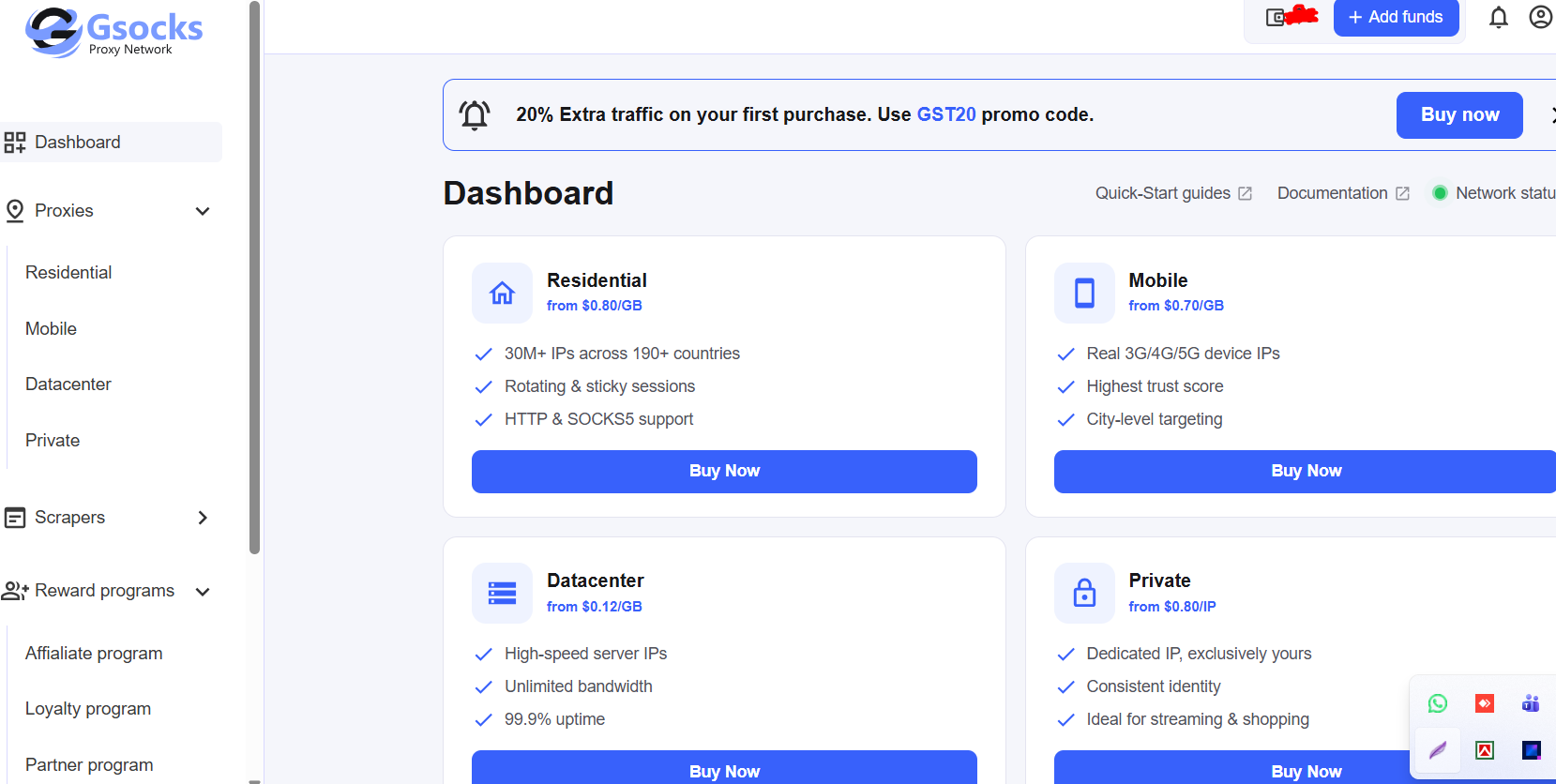
Purchased Residential Traffic
Proxy Generator
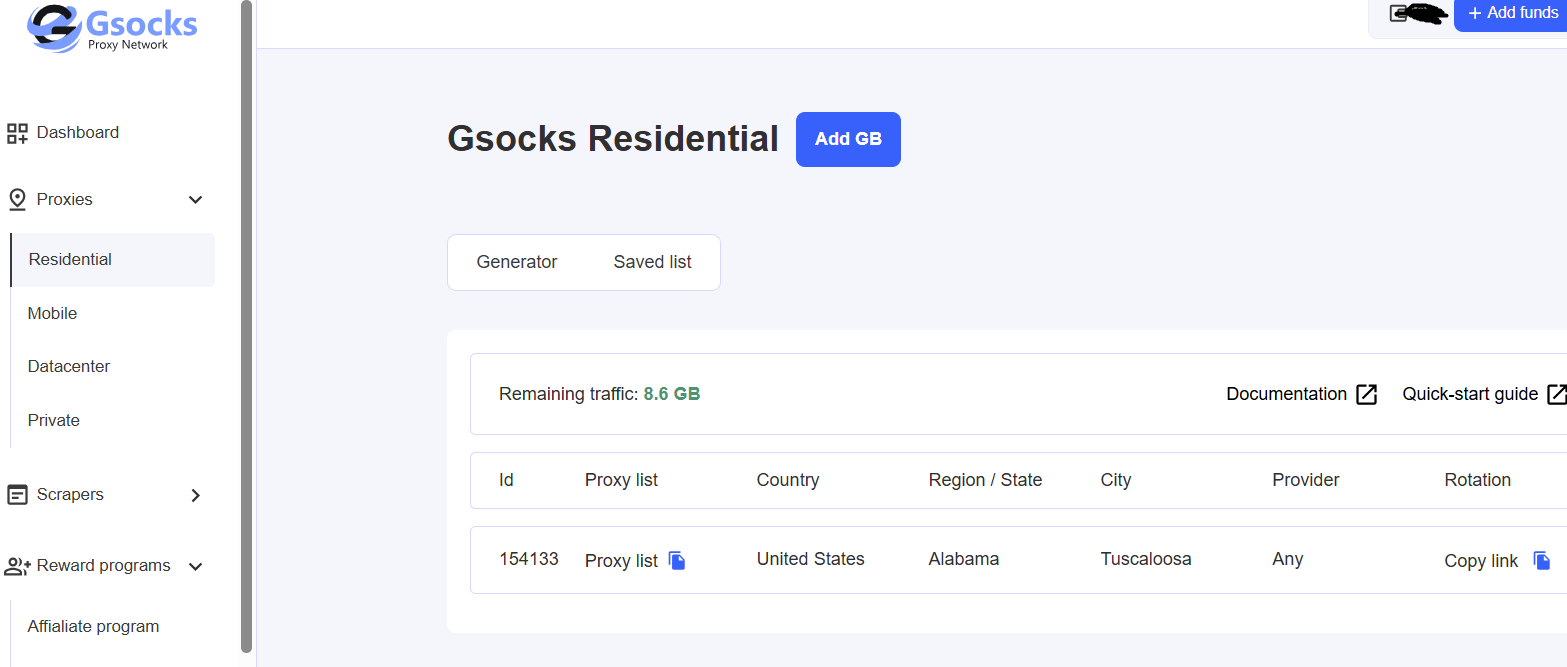
Generated Proxy
We used Gsocks proxies for web scraping and data collection. It performs well on most websites, including Social Media, E-commerce, search engines, and Amazon.
What We Liked
What Could Improve
Rotating vs Sticky Sessions
GSocks supports both rotating and sticky residential proxy sessions.
Rotating proxies
With rotation enabled, the proxy network can change the residential IP being used.
This is useful for workloads such as:
- public web data collection;
- price monitoring;
- SERP research;
- market research; and
- geo-testing.
Sticky proxies
Sticky sessions are designed for tasks where keeping the same identity for multiple requests is more useful.
GSocks currently advertises sticky sessions of up to 60 minutes on its residential pricing page.
We haven't included a measured sticky-session result in our score because this review only publishes results we've actually tested.
Test still to complete
We plan to test whether the same residential IP remains active for the selected sticky duration.
Status: Not yet benchmarked
This is more transparent than assigning a score to a feature we haven't independently tested.
Geo-Targeting
GSocks currently offers country-, region-, and city-level residential proxy targeting.
The company advertises availability across 190+ countries.
That's useful on paper, but there's a difference between a provider offering a country in its dashboard and every generated IP being geolocated correctly by external databases.
For that reason, we're keeping geo accuracy separate from provider coverage.
Provider claim
190+ countries with country, region, and city targeting.
Our geo-accuracy test
Status: Not yet completed
For our future benchmark, we'll generate a sample of location-targeted IPs and verify them against an independent IP geolocation database.
Until that test is complete, we won't publish an invented geo-accuracy percentage.
IP Rotation Test
Another important question is how much IP diversity you actually receive.
A provider may advertise millions of IPs globally, but that doesn't automatically mean a small test session will receive thousands of unique addresses.
We'll measure this separately.
Planned methodology
Generate rotating residential proxies → send repeated requests → record returned IP → remove duplicates → calculate unique-IP percentage.
Status: Not yet completed
This will tell us more about the rotation behavior we actually experience than simply repeating the advertised pool size.
Gsocks Residential Proxies Pros and Cons
Pros
- 99.8% success rate in our 1,000-request test
- Only 2 failures in 1,000 requests
- Country/region/city targeting
- Works for scraping and automation workflows
- Rotating and sticky sessions
- Traffic doesn't expire
- Volume discounts
Cons
- 3.29s average response time isn't exceptionally fast
- Cheapest per-GB rates require high volume
- Publicly available pool-size details are less clear than some rivals
Gsocks Residential Proxy Pricing & Plans
| Plan | Price |
|---|---|
| Starter | $4/GB |
| Business (50 GB Traffic) | $3.20/GB |
| Corporate (250 GB Traffic) | $2.40/GB |
| Enterprise | Unlimited scale |
- Traffic-based billing
- Higher-volume plans reduce the per-GB rate
- Enterprise plans available for larger teams
This means Gsocks is not the cheapest entry point in the residential proxy market, but volume pricing gets more competitive for businesses that need larger usage.
Who Should Consider GSocks Residential Proxies?
Based on the features available and our testing so far, GSocks is worth considering for users who need residential proxies for:
Public Web Data Collection
The high success rate we measured makes GSocks interesting for repeated data requests where connection reliability matters.
Price Monitoring
Residential IPs and location controls can be useful when checking publicly available pricing from different regions.
SEO and SERP Research
Location targeting can help researchers examine geographically different search results.
Ad Verification and Geo-Testing
Country, region, and city targeting may be useful for checking how public web content or advertising appears in different locations.
Market Research
Rotating residential IPs can support geographically distributed public-data research.
Feature-by-Feature Comparison With Other Providers
The table below provides a detailed side-by-side comparison of key features across both providers.
| Provider | IP Pool | Starting Price | Best For |
|---|---|---|---|
| Gsocks | Residential proxies | $4/GB | Mid-scale scraping and automation |
| Bright Data | Large enterprise network | $8/GB | Enterprise data collection |
| Oxylabs | Enterprise residential network | $6/GB | Large-scale extraction |
| Decodo | Balanced residential product | $3.75/GB | Mixed budget/performance users |
Final Verdict & Scorecard
Category | Score | Why |
Success Rate | 4.9/5 | 998 / 1,000 requests succeeded (99.8%) |
Reliability | 4.9/5 | Only 2 / 1,000 requests failed (0.2%) |
Speed | 4.0/5 | 3.29s average response time |
Pricing | 4.3/5 | Competitive volume discounts |
Setup & Dashboard | 4.5/5 | Straightforward dashboard and flexible proxy generator |
Overall Rating:  4.5 / 5 — Very Good
Gsocks is best for users who want a practical residential proxy provider for mid-scale projects. If someone needs maximum network transparency, huge published IP-pool stats, or advanced enterprise tooling, bigger providers may be a better fit.
Frequently Asked Questions (FAQs)
Gsocks is used for residential proxy tasks such as scraping, OSINT, automation, brand protection, and international traffic routing.
Gsocks currently lists residential proxy pricing starting at $4/GB, with larger plans at $3.20/GB and $2.40/GB.
Yes. Its positioning and user reviews both suggest it is suitable for web scraping and automation workflows, especially where residential traffic quality matters.
Based on user feedback and product positioning, Gsocks supports proxy rotation, and reviewers specifically praise its rotation system and stable performance.
Author
Jayden Sprent (Proxy Specialist)
Hi, I'm Jayden Sprent. Dive into the world of proxy servers with my expert evaluations and insightful analyses based on thorough research. I'll share my experiences and comprehensive guides to help you make informed decisions about proxy services.
Learn More About Jayden Sprent