
Buyresidentialproxy / Reviews / Nodemaven Residential Proxy

Nodemaven Review
Nodemaven Residential Proxies Review (2026): Our Hands-On Test
Rating 4.7 / 5
We purchased and tested NodeMaven residential proxies ourselves to see how they perform in a real 1,000-request benchmark.
NodeMaven completed 999 out of 1,000 requests successfully, with only one failed request. This produced a 99.90% success rate and an average response time of 1.92 seconds.
Based on our test, NodeMaven delivered excellent reliability and fast overall performance. It is a strong option for users who need residential proxies for scraping, automation, and other tasks where consistent request success matters.

NodeMaven Test Results at a Glance
Metric | Our Test Result |
Total Requests | 1,000 |
Successful Requests | 999 / 1,000 |
Failed Requests | 1 / 1,000 |
Success Rate | 99.90% |
Failure Rate | 0.10% |
Average Response Time | 1.92 sec |
We Purchased and Tested NodeMaven Ourselves
A proxy provider can advertise a large IP pool and high success rates, but those claims do not always show how the network performs when you send real requests through it.
That is why we tested NodeMaven ourselves.
We purchased residential proxy traffic, configured the proxies, and ran our own benchmark instead of simply repeating the specifications published on the NodeMaven website.
Our main performance benchmark consisted of 1,000 real requests.
We recorded:
- successful requests;
- failed requests;
- success rate;
- failure rate; and
- average response time.
NodeMaven completed 999 out of 1,000 requests successfully, with only one failure. The result showed strong connection reliability and a fast 1.92-second average response time.
Test #1: NodeMaven 1,000-Request Success Rate
We sent 1,000 requests through NodeMaven residential proxies and recorded every successful and failed response.
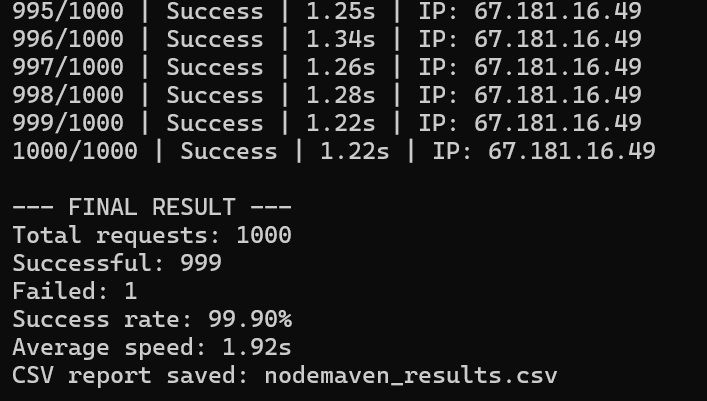
Results:
Successful: 999/1000
Failed: 1/1000
Success Rate: 99.90%
Failure Reasons 0.10%
Proxy Error
Disconnection
NodeMaven completed 999 requests successfully and failed only once. This is an excellent result for a residential proxy benchmark and shows that the connection remained highly reliable throughout our test.
Test #2: NodeMaven Response Time
Success rate tells us whether requests complete. It does not tell us how long they take. So, we also recorded response time during our test. Our Average Response Time: 1.92 Seconds
Across our benchmark, NodeMaven averaged 1.92 seconds per request.
We would describe this as fast for a residential proxy network. But speed needs context.
Residential proxies route traffic through real residential connections rather than conventional datacenter infrastructure. Location, routing, the target server, and the quality of individual residential connections can all affect latency.
For our test, the more important finding was the combination of:
99.90% success rate + 1.92-second average response time
The fastest response was 1.30 seconds. One request took 22.24 seconds, showing that occasional slower connections can occur, but NodeMaven still delivered fast average performance across the full 1,000-request benchmark.
NodeMaven Residential Proxy Features
Now let’s separate our test results from what NodeMaven currently advertises for its residential proxy service.
According to NodeMaven, its residential proxy network includes 30M+ residential IPs across 190+ countries, with country, region, city, ZIP-code, and ISP-level targeting. It also offers rotating IPs, sticky sessions for up to 24 hours, unlimited concurrent sessions, and HTTP(S) and SOCKS5 support.
NodeMaven also says it filters residential IPs for quality before they are assigned to users, aiming to reduce failed requests, blocks, and CAPTCHA challenges.
These are provider-reported specifications. Our 1,000-request test verifies NodeMaven’s performance in our test environment; it does not independently verify the full IP-pool size, targeting availability, or IP-quality claims.
NodeMaven Residential Proxy Overview
Feature | NodeMaven Specification |
|---|---|
IP Pool | 30M+ advertised residential IPs |
Countries | 190+ advertised countries |
Geo Targeting | Country, region, city, ZIP code, and ISP targeting |
Rotation | Rotating IPs or sticky sessions |
Sticky Sessions | Up to 24 hours |
Concurrent Sessions | Unlimited |
IP Quality | Provider-reported real-time IP quality and fraud-score filtering |
Protocols | HTTP(S) and SOCKS5 |
Starting Price | From $2.20/GB |
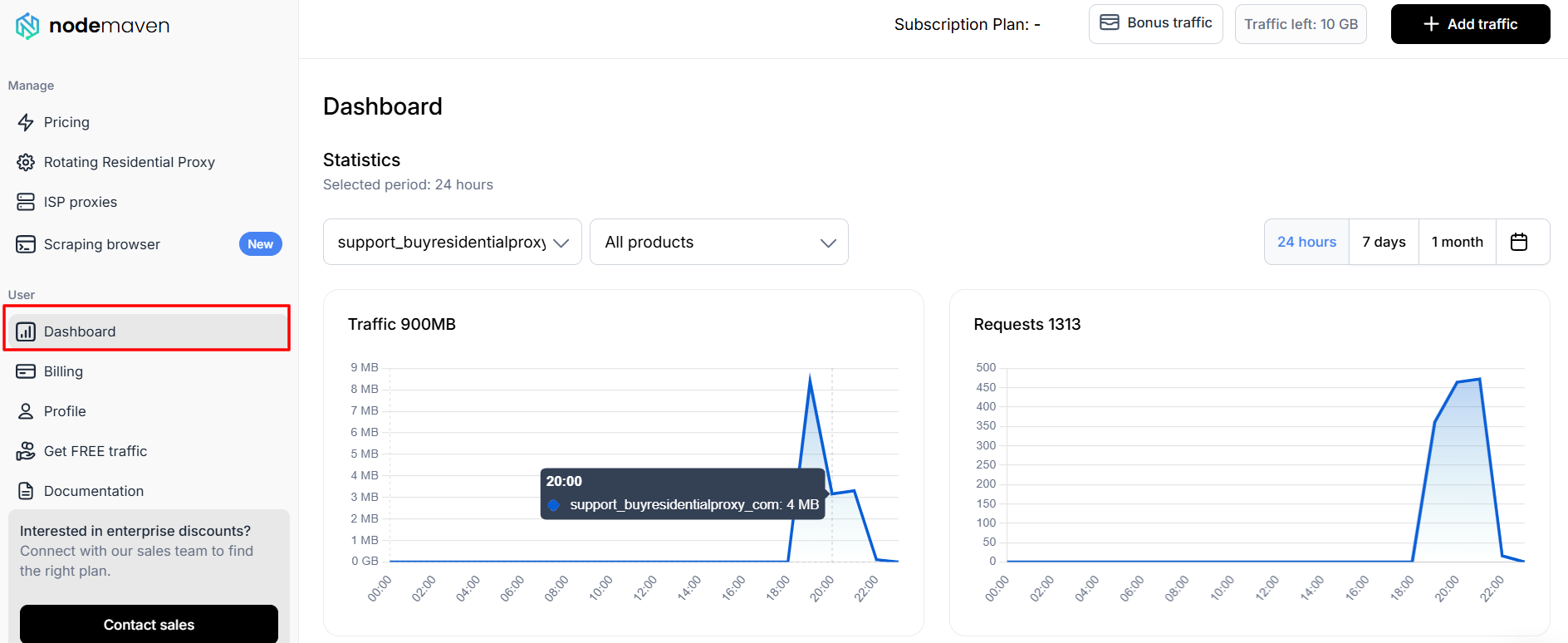
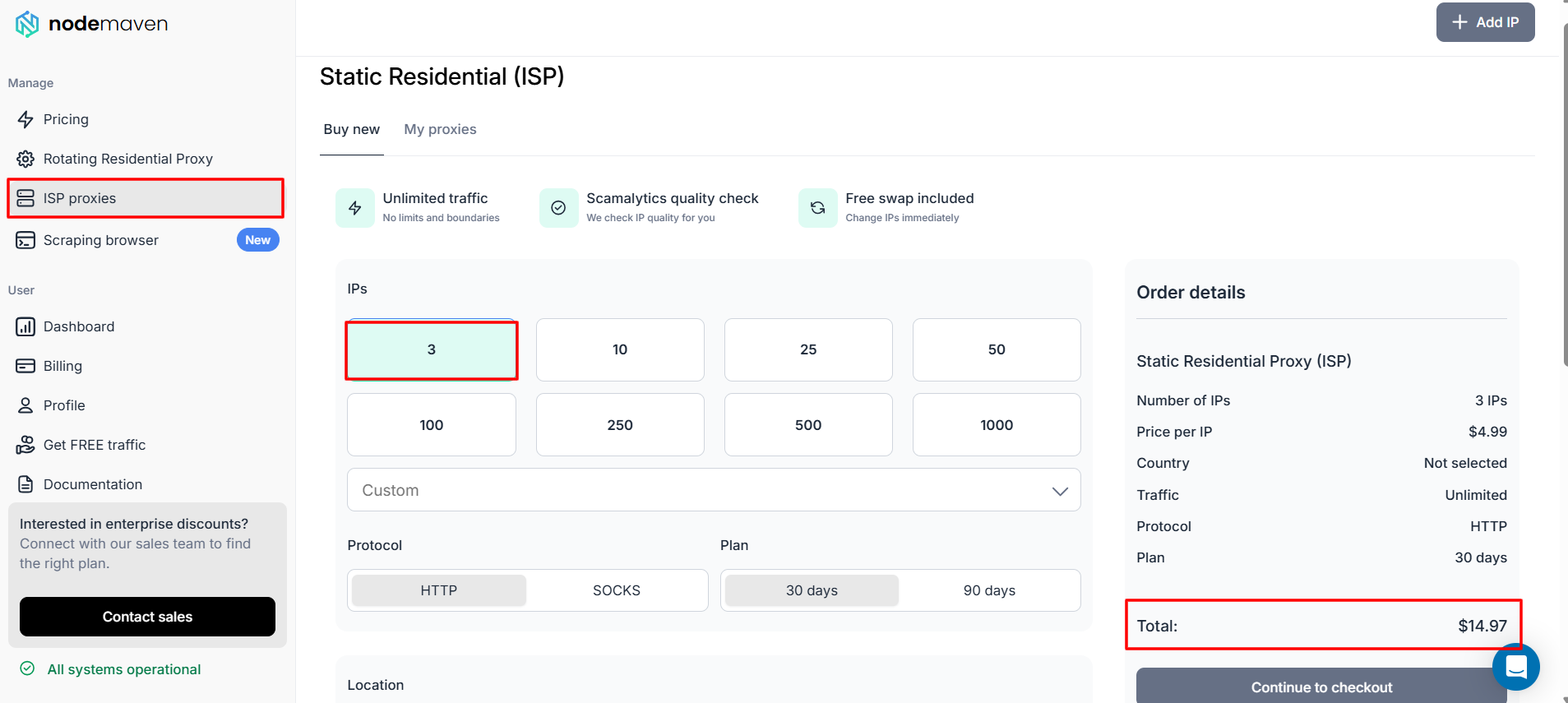
The NodeMaven dashboard separates Rotating Residential Proxy and ISP Proxies into different sections. Its main dashboard also shows traffic usage, request activity, selectable date ranges, billing, and documentation. The separate ISP proxy section offers static IP plans with unlimited traffic, but this is a different product from the rotating residential proxies tested in this review.
Dashboard Residential Traffic
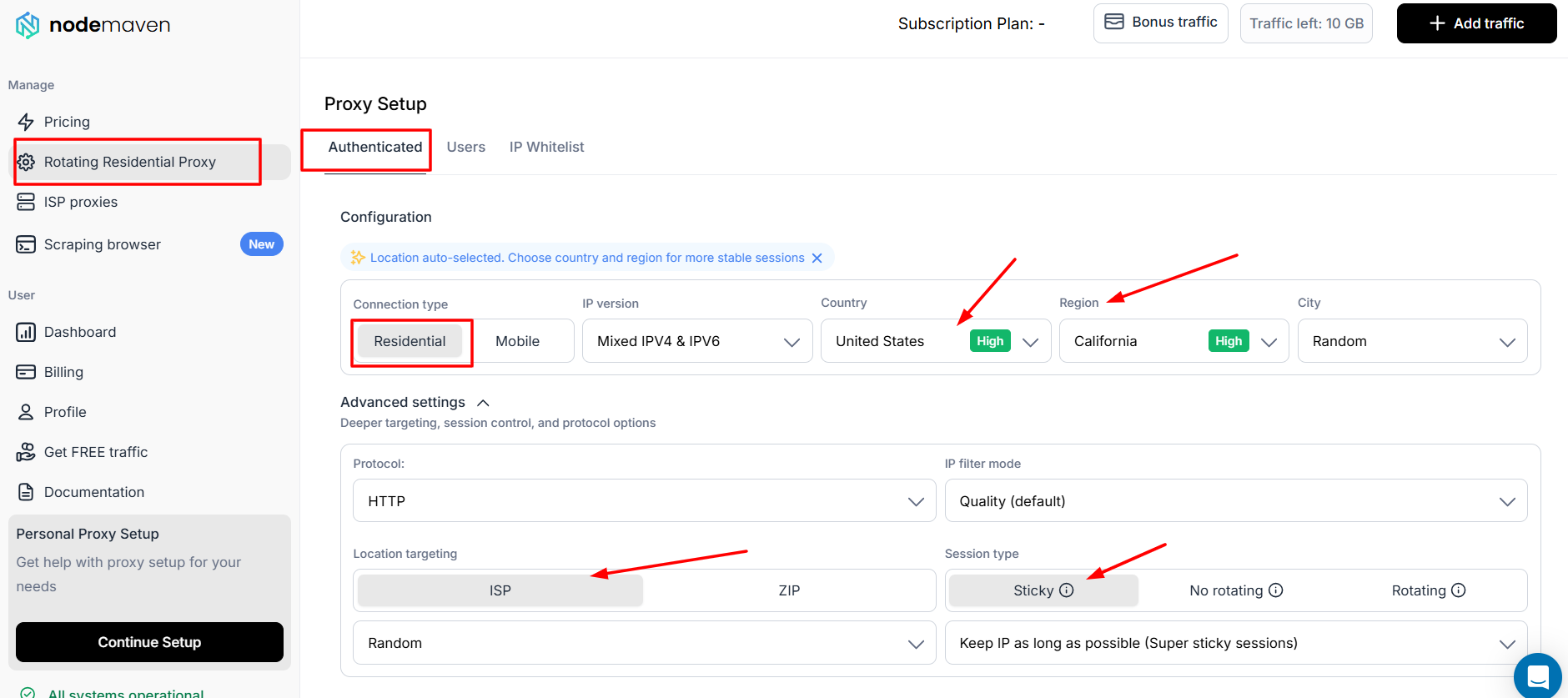
Proxy Generator
Generated Proxy
Rotating vs Sticky Sessions & Geo-Targeting
NodeMaven gives users control over both session behavior and proxy location from its setup dashboard.
Rotating Sessions
A rotating session changes the residential IP automatically. This is useful for large scraping tasks, price monitoring, SEO research, and other workflows where you need many different IP addresses.
Sticky Sessions
A sticky session keeps the same residential IP for a selected period. NodeMaven supports sticky sessions for up to 24 hours, making them more suitable for browser automation, account workflows, logins, and tasks that need a consistent IP identity.
Geo-Targeting
NodeMaven allows users to select a proxy location by:
- country;
- region;
- city;
- ZIP code; or
- ISP.
In the dashboard, you can choose a location before generating your proxy credentials, or leave it set to random. This flexibility is helpful for testing location-specific search results, checking ads, monitoring local prices, and collecting region-specific public web data.
NodeMaven Residential Proxies Pros & Cons
Pros
- 99.90% success rate in our 1,000-request test
- Only 1 failures in 1,000 requests
- Country/region/city targeting
- Works for scraping and automation workflows
- Rotating and sticky sessions
Cons
- One request took 22.24 seconds, showing occasional latency spikes can occur
- Entry trial is paid ($3.50), not free
NodeMaven vs Other Residential Proxy Comparison
The table below compares NodeMaven’s residential proxies with other well-known providers. Prices are starting rates and can change based on plan size, billing cycle, and promotions.
Provider | Advertised IP Pool | Starting Price |
|---|---|---|
NodeMaven | 30M+ IPs | From $2.20/GB |
Webshare | 80M+ IPs | From $1.40/GB |
Decodo | 115M+ IPs | From $3.75/GB |
Oxylabs | 175M+ IPs | From $6/GB |
Bright Data | 400M+ IPs | From $4/GB |
Final Verdict & Scorecard
Category | Score | Why |
Success Rate | 5.0/5 | 999 / 1,000 requests succeeded (99.90%) |
Reliability | 4.9/5 | Only 1 / 1,000 requests failed (0.10%) |
Speed | 4.6/5 | 1.92s average response time |
Pricing | 4.3/5 | Residential proxies start from $2.20/GB, with a $3.50 trial |
Setup & Dashboard | 4.7/5 | Advanced but clear controls for location, protocol, IP quality, and session type |
Overall Rating:  4.7 / 5 — Excellent
NodeMaven delivered excellent results in our 1,000-request test, combining a 99.90% success rate with a fast 1.92-second average response time. Its detailed geo-targeting, flexible sticky sessions, and IP-quality settings make it a strong choice for users who need more control than a basic rotating proxy plan.
Frequently Asked Questions (FAQs)
In our 1,000-request benchmark, NodeMaven completed 999 requests successfully and recorded only one failure. That equals a 99.90% success rate.
NodeMaven recorded a 1.92-second average response time. The fastest response was 1.30 seconds, while the slowest was 22.24 seconds.
Yes. NodeMaven lets users choose rotating, sticky, or no-rotation sessions. Sticky residential sessions can last for up to 24 hours.
Yes. NodeMaven advertises country, region, city, ZIP-code, and ISP-level targeting. You can also choose a random location from the dashboard.
Explore Alternatives to NodeMaven
Author
Jayden Sprent (Proxy Specialist)
Hi, I'm Jayden Sprent. Dive into the world of proxy servers with my expert evaluations and insightful analyses based on thorough research. I'll share my experiences and comprehensive guides to help you make informed decisions about proxy services.
Learn More About Jayden Sprent