
Buyresidentialproxy / Reviews / proxygen Residential Proxy

Proxy-Gen Review
Proxy-Gen Residential Proxies Review (2026): Our Hands-On Test
Rating 4.5 / 5
We purchased and tested Proxygen residential proxies ourselves instead of relying only on the provider’s advertised performance figures.
In our 1,000-request Amazon benchmark, 972 requests succeeded and 28 failed, resulting in a 97.20% success rate. No CAPTCHAs or Amazon blocks were recorded during the test. Proxygen averaged 4.10 seconds per request, with a median response time of 3.50 seconds.
Based on our hands-on results, Proxygen delivered good reliability for Amazon data collection, although its response speed was slower than some of the faster residential proxy providers we tested.

Proxygen Test Results at a Glance
Metric | Our Test Result |
Total Requests | 1,000 |
Successful Requests | 972 / 1,000 |
Failed Requests | 28 / 1,000 |
Success Rate | 97.20% |
Failure Rate | 2.80% |
Average Response Time | 4.10 sec |
Median Response Time | 3.50 sec |
Fastest Response Time | 1.61 sec |
Slowest Response Time | 24.61 sec |
We Purchased and Tested Proxygen Ourselves
A proxy provider can advertise a large IP pool, global coverage, and high uptime, but real performance depends on how the network handles live requests to difficult websites.
That is why we purchased and tested Proxygen residential proxies ourselves rather than relying only on the provider’s published specifications.
We ran a 1,000-request Amazon benchmark through Proxygen’s rotating residential network and recorded:
- Successful requests
- Failed requests
- CAPTCHAs and blocks
- Proxy or network errors
- Response-time metrics
- Downloaded data volume
Proxygen completed 972 of 1,000 requests successfully, producing a 97.20% success rate. We recorded no CAPTCHAs and no Amazon blocks during the test. The 28 failed requests were proxy or network errors rather than target-site blocks.
The average response time was 4.10 seconds, with a median of 3.50 seconds. This shows that Proxygen was reliable enough for most Amazon data-collection tasks, although it was slower than the fastest providers in our benchmark.
Test #1: Proxygen 1,000-Request Amazon Success Rate
We sent 1,000 requests through Proxygen residential proxies to Amazon and recorded every successful and failed request.
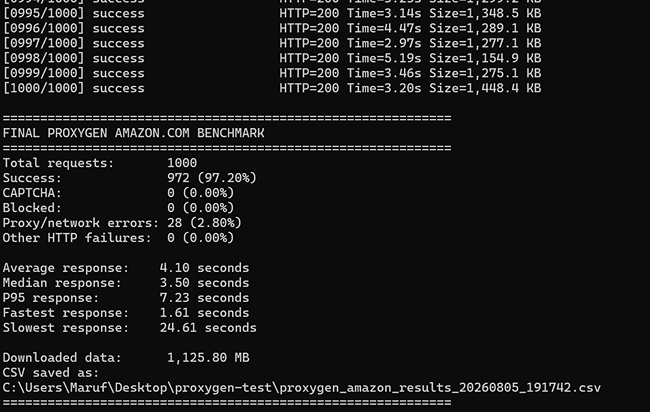
Results:
- Successful: 972 / 1,000
- Failed: 28 / 1,000
- Success Rate: 97.20%
Failure Reasons
- Failure Rate: 2.80%
- CAPTCHAs: 0
- Blocked Requests: 0
For residential proxies, a success rate above 95% is generally considered excellent. Proxygen achieved a 97.20% success rate in our Amazon benchmark, with no CAPTCHAs or target-site blocks recorded.
Test #2: Proxygen Response Time
Success rate tells us whether requests complete, but response time shows how quickly the proxy network delivers results.
During our 1,000-request Amazon benchmark, Proxygen recorded an average response time of 4.10 seconds.
Response-time results:
- Average response time: 4.10 seconds
- Median response time: 3.50 seconds
- P95 response time: 7.23 seconds
- Fastest response: 1.61 seconds
- Slowest response: 24.61 seconds
Proxygen’s speed was usable for Amazon data collection, but it was not among the fastest residential proxy results we have tested. Most requests completed in a reasonable time, although the slower P95 and maximum response times show that performance could vary across individual residential connections.
Proxygen Residential Proxy Features
Now let’s separate our hands-on Amazon test results from the features Proxygen advertises for its residential proxy product.
According to Proxygen, its rotating residential proxy network provides access to 2M+ real home ISP IPs across 195+ countries. The service supports automatic IP rotation, sticky sessions of up to 90 minutes, and HTTP, HTTPS, and SOCKS5 connections.
Feature | Proxygen Specification |
|---|---|
IP Pool | 2M+ advertised residential IPs |
Countries | 195+ countries |
IP Type | Real home ISP residential IPs |
Rotation | Automatic, unlimited IP rotation |
Sticky Sessions | Up to 90 minutes |
Protocols | HTTP, HTTPS & SOCKS5 |
Best Volume Rate | 1TB for $1,199.99 ($1.20/GB) |
Starting Package | 5GB for $9.99 |
How to Set Up Proxygen Residential Proxies
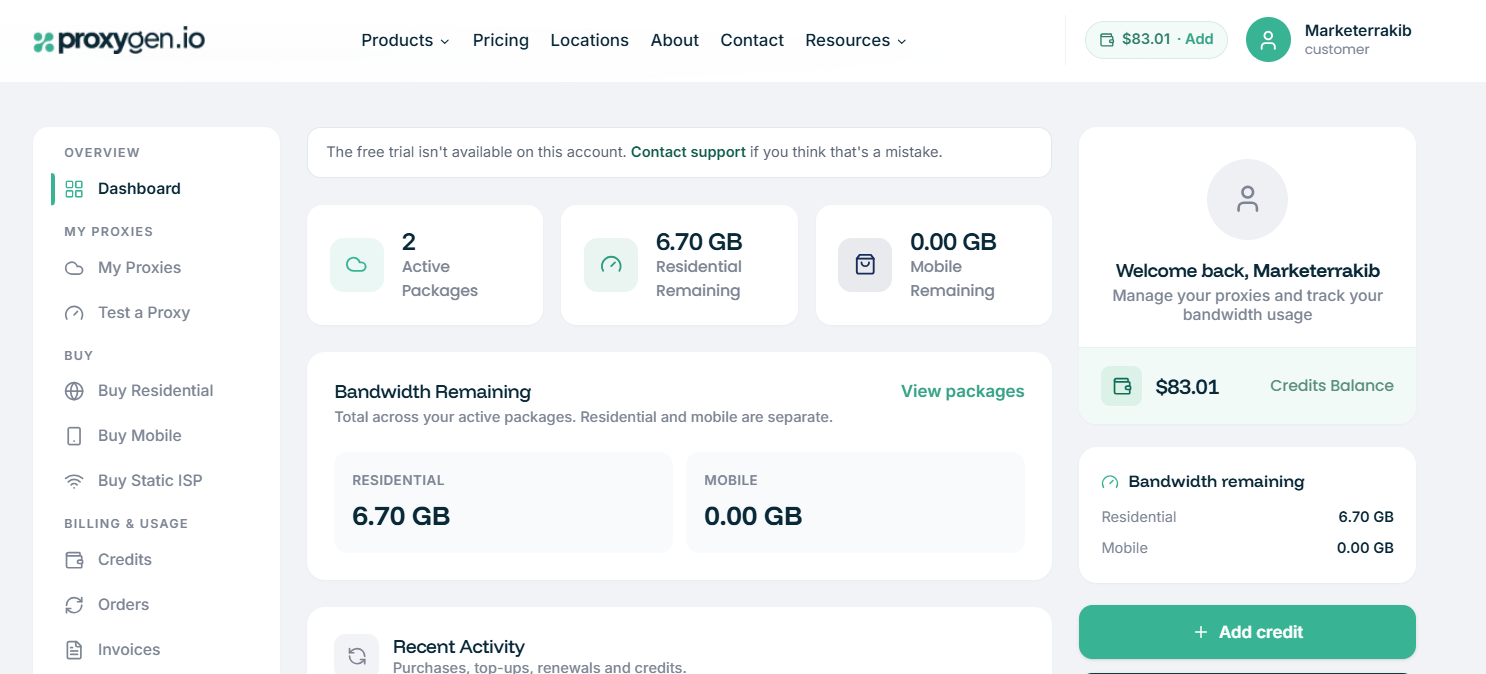
Proxygen has a clean dashboard for purchasing traffic, viewing active proxy packages, tracking bandwidth, and testing connections. The left-side menu separates the main actions clearly: Dashboard, My Proxies, Test a Proxy, Buy Residential, Buy Mobile, and Buy Static ISP.
The dashboard displays the number of active packages, remaining residential and mobile bandwidth, available account credits, and recent activity. This makes it easy to see how much traffic is left before running a larger scraping project.
Step 1: Add credit or buy a residential package
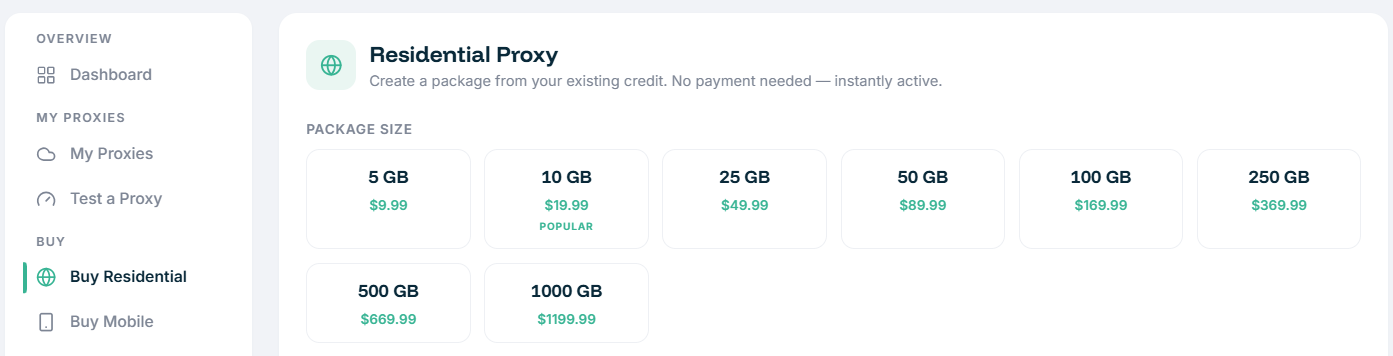
Open Buy Residential and choose the bandwidth package you need. Available packages range from 5GB to 1TB. Once purchased, the package becomes active immediately.
Step 2: Open My Proxies
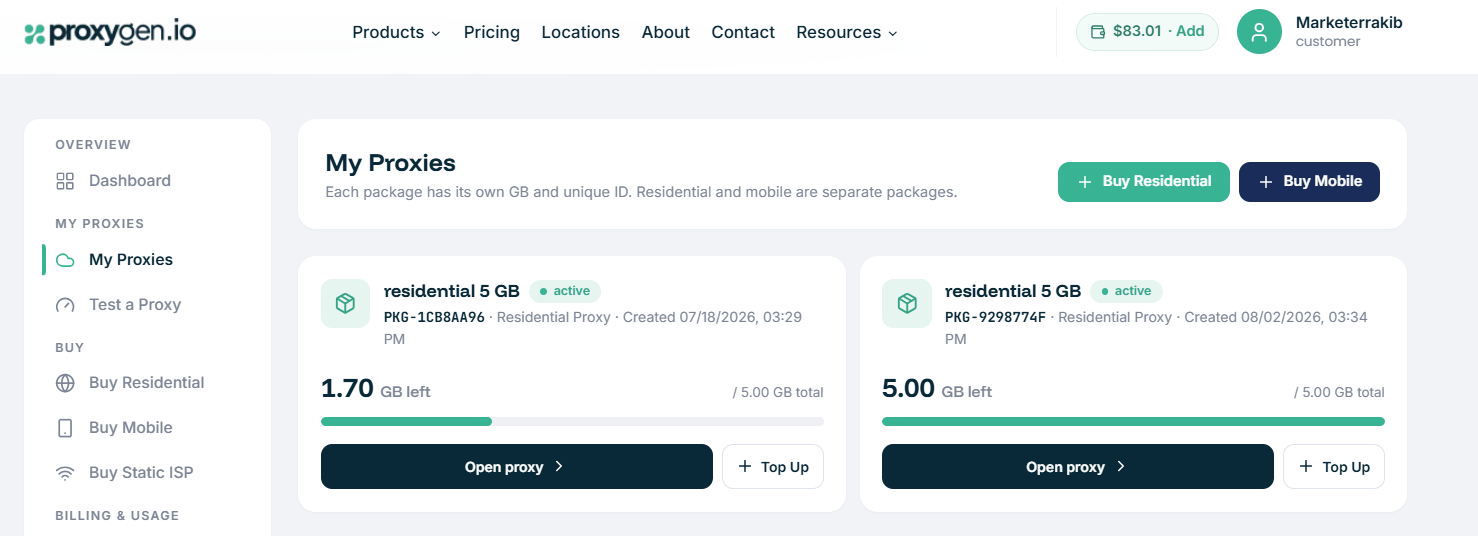
Go to My Proxies to view each active residential package. Every package has its own package ID, total bandwidth, and remaining GB balance.
Step 3: Open the proxy package
Select Open Proxy on the package you want to use. This gives you access to the connection details for that specific residential proxy package.
Step 4: Copy the credentials
Copy the proxy endpoint and your login credentials into your scraper, browser profile, anti-detect browser, or code. Proxygen supports HTTP, HTTPS, and SOCKS5 connections.
Step 5: Test the connection
Use the Test a Proxy option before running a large task. This is helpful for confirming that the connection is active and returning the expected location or IP type.
Step 6: Monitor bandwidth usage
Return to the dashboard or My Proxies page to track remaining GBs. You can use Top Up or add credits when a package needs more bandwidth.
Proxygen Residential Proxies Pros & Cons
Pros
- 97.20% success rate in our 1,000-request
- No CAPTCHAs
- Supports HTTP, HTTPS, and SOCKS5
- Rotation and sticky sessions up to 90 minutes
- reaching about $1.20/GB at 1TB
Cons
- 28 requests failed in our 1,000-request Amazon benchmark
- Smallest plan costs $9.99 for 5GB
Proxygen vs Others Residential Proxy Comparison
Provider | IP Pool | Starting Price |
|---|---|---|
Proxygen | 2M+ residential IPs | $2.00/GB |
Bright Data | 400M+ residential IPs | $8/GB |
Oxylabs | 175M+ residential IPs | $6/GB |
SOAX | 155M+ residential IPs | From $5/GB |
At a Glace best residential proxy provider
Final Verdict & Scorecard
Category | Score | Why |
Success Rate | 4.7/5 | 972 / 1,000 Amazon requests succeeded (97.20%) |
Reliability | 4.6/5 | No CAPTCHAs or Amazon blocks; 28 proxy/network errors (2.80%) |
Speed | 4.0/5 | 4.10s average response time |
Pricing | 4.7/5 | From $2/GB on the smallest plan; volume pricing reaches $1.20/GB |
Setup & Dashboard | 4.5/5 | Clear package management, bandwidth tracking, and proxy test tool |
Overall Rating:  4.5 / 5 — Very Good
Proxygen is a practical residential proxy provider for users who want non-expiring traffic, simple package management, and good Amazon success rates without enterprise-level pricing. Its 97.20% success rate and zero CAPTCHA or block results were strong, but the 4.10-second average response time and 28 proxy/network errors mean faster, more reliable options may suit high-speed or mission-critical workloads better.
Explore Alternatives to Webshare
Frequently Asked Questions (FAQs)
In our 1,000-request Amazon test, Proxygen achieved a 97.20% success rate. We recorded no CAPTCHAs or Amazon blocks, although 28 requests failed because of proxy or network errors.
Proxygen averaged 4.10 seconds per request in our Amazon benchmark. The fastest response was 1.61 seconds, while the slowest was 24.61 seconds.
Proxygen’s smallest residential package is 5GB for $9.99. Larger plans lower the cost per GB, reaching approximately $1.20/GB on the 1TB package.
Yes. Proxygen advertises automatic IP rotation and sticky residential sessions of up to 90 minutes.
Author
Jayden Sprent (Proxy Specialist)
Hi, I'm Jayden Sprent. Dive into the world of proxy servers with my expert evaluations and insightful analyses based on thorough research. I'll share my experiences and comprehensive guides to help you make informed decisions about proxy services.
Learn More About Jayden Sprent