


Why Gamers Use Residential Proxies
Online gaming platforms often restrict access based on:
- region availability
- server routing distance
- IP reputation
- security filters
- DDoS exposure risk
Residential proxies route traffic through real ISP connections, which can improve connection stability and unlock region-restricted game servers.
They help with:
- accessing early releases in other regions
- reducing ping through optimized routing
- protecting against DDoS attacks
- bypassing IP bans
- testing multiplayer servers globally
Some setups can reduce latency by routing traffic more efficiently depending on distance from game servers.
Best Residential Proxies for Gaming (Top Providers)
Oxylabs offers a large residential proxy network with 175M+ IPs across 195+ locations, strong session stability, and precise geo-targeting. It’s commonly used for regional server testing, matchmaking analysis, and automation-assisted gaming workflows that require reliable connection switching. For more information, read our Oxylabs Review.
Key Features
- 175M+ residential IP pool worldwide
- country, city, ZIP, and ASN targeting
- rotating and sticky session support
- unlimited concurrent sessions
- HTTP, HTTPS, and SOCKS5 compatibility
Best For
 large-scale server switching esports research workflows automation-assisted testing global matchmaking simulations
Pros
very large global IP pool precise location targeting stable long-session performance enterprise-grade reliability
Limitation
 requires technical setup experience
- Residential proxies: from ~$3.5–$5.4 per GB
- ISP proxies: from ~$1.6 per IP
- Web Unblocker: from ~$75/month
- Scraping APIs: from ~$49/month
Pricing varies depending on usage scale.
Decodo offers access to 115M+ ethically sourced residential IPs across 195+ locations with flexible rotation control and a simple dashboard that makes setup fast even for beginners. It supports both HTTP(S) and SOCKS5 protocols and provides stable routing with a ~99.86% success rate and 99.99% uptime, making it a strong mid-tier option between budget and enterprise providers. Decodo
Key Features
- 115M+ residential IP pool worldwide
- country, state, city, ZIP, and ASN targeting
- rotating and sticky session support
- HTTP(S) and SOCKS5 compatibility
- unlimited threads and concurrent connections
- <0.6s average response time
Best For
- Steam region testing
- multiplayer experiments
- price-region comparisons
- entry-level automation workflows
Pros
strong price-to-performance ratio large global IP coverage flexible session rotation options beginner-friendly dashboard setup
Limitation
fewer advanced filtering controls than enterprise proxy platforms
Typical residential proxy pricing:
- Pay-as-you-go: about $4/GB
- Subscription plans: from about $3.75/GB
- Large-volume plans: down to about $2/GB
Pricing improves significantly with higher bandwidth plans.
Bright Data provides access to 150M+ residential IPs across 195+ countries with advanced geo-targeting, rotating and sticky sessions, and SOCKS5 protocol support for flexible traffic routing. Because SOCKS5 can handle both TCP and UDP traffic types, it works well for gaming workflows that require stable connections and global server switching. For more information, read our BrightData Review.
Key Features
- 150M+ residential IP network worldwide
- country, city, ZIP, carrier, and ASN targeting
- rotating and sticky session support
- SOCKS5 compatibility for TCP and UDP traffic routing
- ~99.95% success rate and 99.99% uptime (provider-reported)
Best For
region-locked game access multiplayer server testing competitive gaming environments global latency comparison workflows
Pros
extremely large global IP coverage precise geo-targeting filters supports TCP and UDP via SOCKS5 routing stable performance across regions
Limitation
premium pricing tier compared to mid-range providers
Typical residential proxy pricing:
- residential proxies: from about $2.94/GB
- datacenter proxies: from about $1.30/GB
- ISP proxies: from about $0.90/GB
- mobile proxies: from about $7.50/GB
Pricing scales depending on bandwidth usage.
SOAX provides access to 155M+ residential IPs across 195+ locations with city-level targeting, flexible rotation timing, and customizable session control. Its proxy network supports HTTP(S), SOCKS5, UDP, and QUIC protocols, making it suitable for switching between global gaming servers and testing region-locked gameplay environments.
Because SOAX allows precise targeting down to country, region, city, and ISP level, it’s especially useful for localized matchmaking tests and beta-release availability checks across regions. For more information, read our Soax Review.
Key Features
- 155M+ residential IP pool worldwide
- country, region, city, and ISP targeting
- rotating and sticky session support
- customizable IP refresh intervals
- HTTP(S), SOCKS5, UDP, and QUIC compatibility
- ~99.95% proxy success rate (provider-reported)
Best For
unlocking regional game servers beta-release testing across locations localized gameplay research matchmaking region simulations
Pros
precise city-level geo-targeting flexible rotation timing control clean ethically sourced residential IP pool strong success rates for region switching
Limitation
traffic-based billing can scale quickly with heavy usage
Typical residential proxy pricing:
- subscription plans from about $90/month (25GB)
- pay-as-you-go plans from about $4/GB
- trial access: $1.99 for 400MB (3 days)
Pricing improves at higher bandwidth tiers.
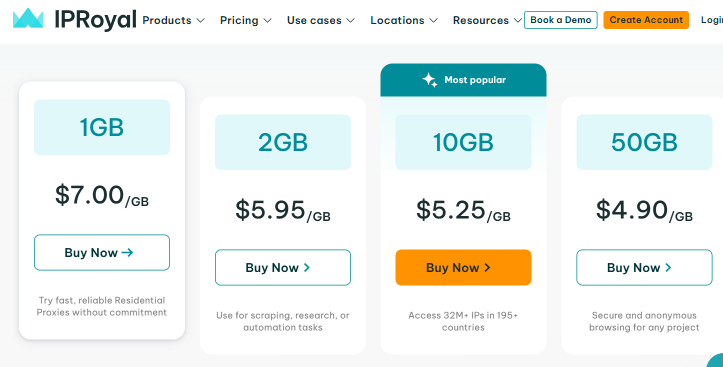
IPRoyal offers affordable residential and ISP gaming proxies with global geo-targeting across 195+ countries, flexible rotation options, and SOCKS5 compatibility for stable server switching. Its pay-as-you-go pricing and non-expiring traffic make it a practical option for gamers who need occasional region changes or multi-account testing without enterprise costs. For more information, read our IPRoyal Review.
Key Features
- rotating residential proxies with city/state targeting
- sticky session support with configurable duration
- SOCKS5 compatibility for gaming traffic routing
- traffic that does not expire (pay-as-you-go model)
- multiple proxy types including ISP and mobile options
Pricing Overview
Typical gaming-proxy pricing:
- rotating residential proxies: from $1.75/GB
- ISP proxies: from $2.40 per proxy
- datacenter proxies: from $1.39 per proxy
- mobile proxies: from $10.11/day
Pricing improves with larger usage volumes.
Best For
casual gamers starter proxy workflows occasional region switching multi-account gameplay setups
Pros
affordable pay-as-you-go pricing simple setup for beginners flexible rotation and sticky sessions supports geo-restricted server access
Limitation
smaller residential IP pool than enterprise providers
What Makes a Residential Proxy Good for Facebook?
Facebook’s security system evaluates connection behavior continuously, so proxy quality directly affects account survival rates.
Key factors:
Sticky Sessions
Stable sessions reduce re-verification loops during login activity.
Clean Residential IP Reputation
High-trust IP addresses reduce restriction risks.
Geo Targeting Accuracy
Matching proxy region with account location improves trust signals.
Rotation Control
Rotation supports automation workflows safely.
Pricing Model
Bandwidth-based pricing works best for testing before scaling.
When Should You Use Residential Proxies for Facebook?
Residential proxies are especially useful if you:
- manage multiple Facebook accounts
- run localized ad campaigns
- test creatives across regions
- collect public page insights
- scale agency workflows
Using separate proxies per account significantly reduces account linking risk.
To learn more, you can Check our : Best Residential Proxies List
FAQs: FAQs About Residential Proxies for Facebook
One proxy per account is recommended for long-term stability.
Sticky sessions are better for account logins. Rotating proxies work better for research tasks.
No. Device fingerprints and behavior patterns still affect account safety.
Free proxies are usually detected quickly and may expose account data.